Page History
[  |../../index.htm#lansa/vlfonetutorials_0395.htm]
Visual LANSA フレームワーク ガイド > チュートリアル > VLF-ONE Web アプリケーションのチュートリアル > フィルターとコマンド・ハンドラーの手動作成 > フィルターの手動によるコーディングとスナップイン > フィルター用の再利用可能パーツを作成
...
Wiki Markup
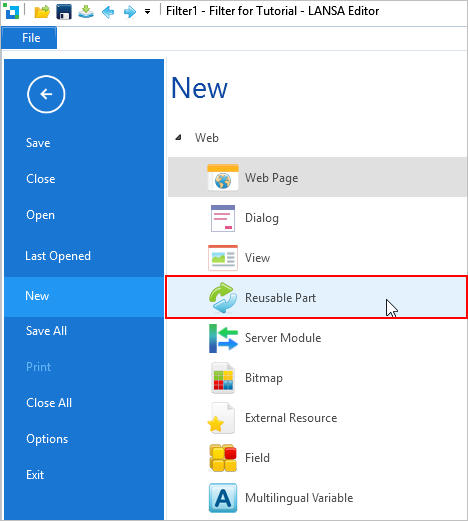
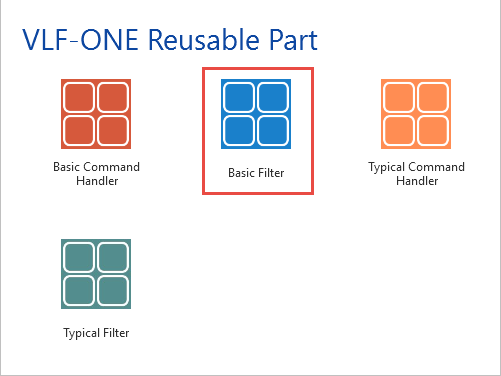
を選択します。 !worddavaf485e25f57cd86bb5b0fc63f3f1b1cc.png|height=32,width=32! \[VLF-ONE 再利用可能パーツ\] の \ [基本フィルター\] を選択します。 !worddavaf485e25f57cd86bb5b0fc63f3f1b1cc.png|height=32,width=32! フィルターの名前と記述を入力し、ターゲット プラットフォームは Web ブラウザにします。 !worddavaf485e25f57cd86bb5b0fc63f3f1b1cc.png|height=32,width=32! \[作成\] をクリックします。 フィルターがエディターで開かれたら、これをダブルクリックして詳細を表示します。祖先が、すべての VLF-ONE フィルターの共通祖先である #VF_AC007O になっていることに注意してください。 !worddavaf485e25f57cd86bb5b0fc63f3f1b1cc.png|height=32,width=32! \[ソース\] タブに切り替えて、コードを次のコードに置き換えます。 を選択します。
フィルターの名前と記述を入力し、ターゲット プラットフォームは Web ブラウザにします。
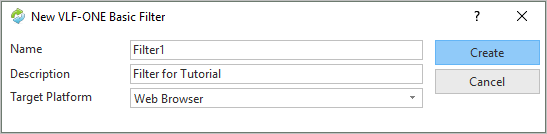
[作成] をクリックします。
フィルターがエディターで開かれたら、これをダブルクリックして詳細を表示します。祖先が、すべての VLF-ONE フィルターの共通祖先である #VF_AC007O になっていることに注意してください。
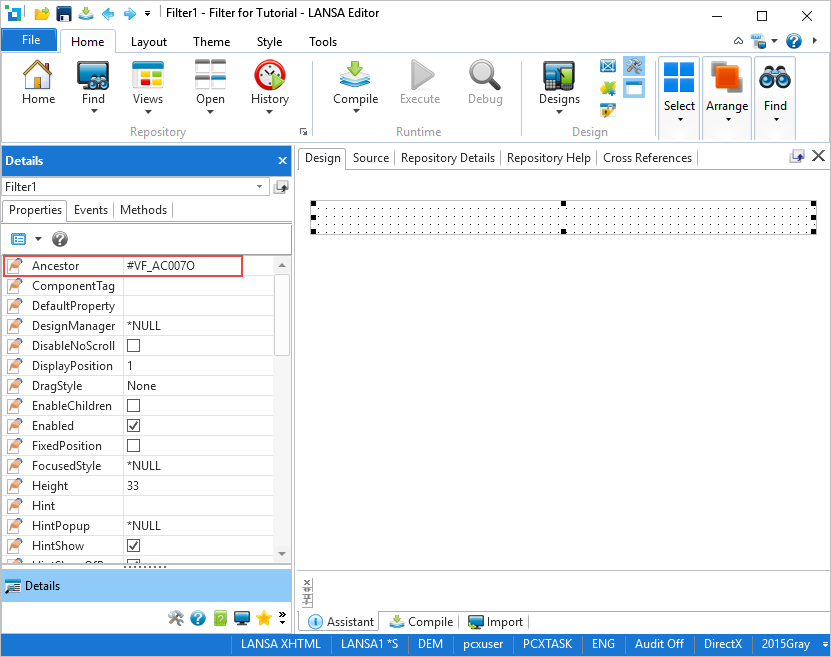
[ソース] タブに切り替えて、コードを次のコードに置き換えます。
| Code Block |
|---|
Function Options(*DIRECT)
Begin_Com Role(*EXTENDS #VF_AC007O) Layoutmanager(*NULL) Width(249) Height(161)


Define_Com Class(#xEmployeeSurname.Visual) Name(#SearchSurname) Displayposition(1) Height(25) Parent(#COM_OWNER) Tabposition(1) Width(209) Labeltype(Caption) Marginleft(0) Top(48) Left(8)
Define_Com Class(#PRIM_LABL) Name(#Label1) Caption('Specify full or partial surname:') Displayposition(2) Ellipses(Word) Height(25) Left(12) Parent(#COM_OWNER) Tabposition(2) Tabstop(False) Top(27) Verticalalignment(Center) Width(197)
|
...
* Used to save and restore search values |
...
Def_List Name(#Save_Keys) Fields(#xEmployeeSurname #xEmployeeGivenNames) Type(*Working) Entrys(1) |
...
...
* The list used to receive data from the server module |
...
Def_List Name(#xEmployeeList) Fields(#xEmployeeIdentification #xEmployeeSurname #xEmployeeGivenNames #xEmployeeStreet #xEmployeeCity #xEmployeeState #xEmployeePostalCode #xEmployeeHomeTelephone #xEmployeeBusinessTelephone #xEmployeeStartDate #xEmployeeTerminationDate #xDepartmentCode #xEmployeeSalary) Counter(#ListCount) Type(*Working) Entrys(*Max) |
...
...
* -------------------------------------------------------------------------- |
...
Mthroutine Name(uInitialize) Options(*REDEFINE) |
...
* Do ancestor first |
...
#COM_ANCESTOR.uInitialize |
...
...
Endroutine |
...
* -------------------------------------------------------------------------- |
...
...
Evtroutine Handling(#SearchSurname.Enter) |
...
...
* Clear all messages |
...
#AVFRAMEWORKMANAGER.avClearMessages Requester(#COM_OWNER) |
...
...
* Only search if a search value has been entered |
...
If (#SearchSurname.Trim <> "") |
...
#COM_OWNER.SelectEmployeeData |
...
* Otherwise issue a message |
...
Else |
...
#AVFRAMEWORKMANAGER.avIssueMessage Text("Enter some part of the surname") Requester(#COM_OWNER) Type(WARN) |
...
Endif |
...
...
Endroutine |
...
Mthroutine Name(SelectEmployeeData) |
...
...
* Define the Server Module method routine used to get employee data from the server |
...
Define_Com Class(#SModule1.FindxEmployeeBySurna) Name(#Find) |
...
...
* Save the current key values from overwrites done by the select loop |
...
Inz_List Named(#Save_Keys) |
...
* Indicate to the user that we are busy #COM_OWNER.avGotoBusyState Showbusytext('Searching') Animated(False) |
...
...
* Ask Server Module SModule1 to get the data from the server |
...
#Find.ExecuteAsync( #SearchSurname #xEmployeeGivenNames #xEmployeeList ) |
...
...
* The call is asynchronous so we have an event that occurs when the call is finished |
...
Evtroutine Handling(#Find.Completed) |
...
...
* Read the list returned by Server Module SModule1 |
...
Selectlist Named(#xEmployeeList) |
...
...
#avListManager.AddtoList Visualid1(#xEmployeeIdentification) Visualid2(#xEmployeeSurname + ', ' + #xEmployeeGivenNames) Akey1(#xEmployeeIdentification) |
...
...
Endselect |
...
...
* Restore the saved key values |
...
Get_Entry Number(1) From_List(#Save_Keys) |
...
...
* Go back to display free state |
...
#com_Owner.avGotoFreeState |
...
...
Endroutine |
...
Endroutine * -------------------------------------------------------------------------- End_Com |
...
...
[デザイン
...
]
...
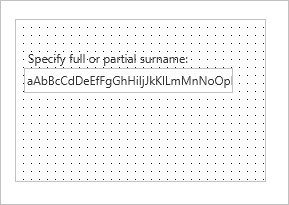
タブに切り替えて、をフィルターのユーザー・インターフェースを確認します。
フィルターをコンパイルします。