Page History
[  |../../index.htm#lansa/vlfonetutorials_0520.htm]
Visual LANSA フレームワーク ガイド > チュートリアル > VLF-ONE Web アプリケーションのチュートリアル > 理解しておくと便利な事柄 > 設定パネルの作成 > 設定パネルの編集
...
次のステップとして、設定パネルにボタンを追加し、このボタンのクリック・イベントがフレームワーク・マネージャに背景パネルの設定変更を要求するようにしなければいけません。
設定パネル (XXX_SettingsPane) を開き、ソースコードを以下のコードに置き換えます。
   * -----------------------------------------------------------------------------------------------
   * This is the custom settings pane for framework CCC Framework
   * -----------------------------------------------------------------------------------------------
   Begin_Com Role(*EXTENDS #VF_AC030O) Width(327)
...
   * -----------------------------------------------------------------------------------------------
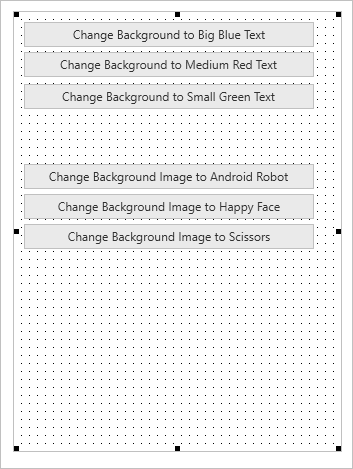
   Define_Com Class(#Prim_phbn) Name(#BlueTextButton) Parent(#COM_OWNER) Caption('Change Background to Big Blue Text') Displayposition(6) Tabposition(6) Width(290)
   Define_Com Class(#Prim_phbn) Name(#RedTextButton) Parent(#COM_OWNER) Caption('Change Background to Medium Red Text') Displayposition(5) Tabposition(5) Width(290) Top(40)
   Define_Com Class(#Prim_phbn) Name(#GreenTextButton) Parent(#COM_OWNER) Caption('Change Background to Small Green Text') Displayposition(4) Tabposition(4) Width(290) Top(72)
...
   * -----------------------------------------------------------------------------------------------
   Define_Com Class(#Prim_phbn) Name(#Image1Button) Parent(#COM_OWNER) Caption('Change Background Image to Android Robot') Displayposition(3) Tabposition(3) Width(290) Top(152) Componenttag('ANDROID_GOOGLE.PNG')
   Define_Com Class(#Prim_phbn) Name(#Image2Button) Parent(#COM_OWNER) Caption('Change Background Image to Happy Face') Displayposition(2) Tabposition(2) Width(290) Top(182) Componenttag('emoticon_happy.png')
   Define_Com Class(#Prim_phbn) Name(#Image3Button) Parent(#COM_OWNER) Caption('Change Background Image to Scissors') Displayposition(1) Tabposition(1) Width(290) Top(212) Componenttag('cut_outline.png')
...
   * -----------------------------------------------------------------------------------------------
   Define_Com Class(#Prim_vs.SolidBrush) Name(#TransparentBrush) Color(Transparent)
   Define_Com Class(#Prim_vs.Style) Name(#LargeBlueFont) Fontsize(64) Fontunits(Pixel) Backgroundbrush(#TransparentBrush) Textcolor(Blue)
   Define_Com Class(#Prim_vs.Style) Name(#MediumRedFont) Fontsize(32) Fontunits(Pixel) Backgroundbrush(#TransparentBrush) Textcolor(Red)
   Define_Com Class(#Prim_vs.Style) Name(#SmallGreenFont) Fontsize(11) Fontunits(Pixel) Backgroundbrush(#TransparentBrush) Textcolor(Green)
...
   * -----------------------------------------------------------------------------------------------
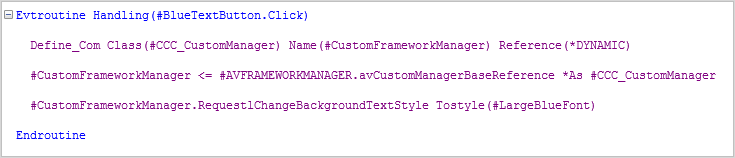
   Evtroutine Handling(#BlueTextButton.Click)
...
Define_Com Class(
...
#EOM_CustomManager) Name(#CustomFrameworkManager) Reference(*DYNAMIC)
   #CustomFrameworkManager <= #AVFRAMEWORKMANAGER.avCustomManagerBaseReference *As
...
 #EOM_CustomManager
   #CustomFrameworkManager.RequestlChangeBackgroundTextStyle Tostyle(#LargeBlueFont)
   Endroutine
...
   * -----------------------------------------------------------------------------------------------
   Evtroutine Handling(#RedTextButton.Click)
   Define_Com Class(
...
#EOM_CustomManager) Name(#CustomFrameworkManager) Reference(*DYNAMIC)
   #CustomFrameworkManager <= #AVFRAMEWORKMANAGER.avCustomManagerBaseReference *As
...
 #EOM_CustomManager
   #CustomFrameworkManager.RequestlChangeBackgroundTextStyle Tostyle(#MediumRedFont)
   Endroutine
...
   * -----------------------------------------------------------------------------------------------
   Evtroutine Handling(#GreenTextButton.Click)
   Define_Com Class(
...
#EOM_CustomManager) Name(#CustomFrameworkManager) Reference(*DYNAMIC)
   #CustomFrameworkManager <= #AVFRAMEWORKMANAGER.avCustomManagerBaseReference *As
...
 #EOM_CustomManager
   #CustomFrameworkManager.RequestlChangeBackgroundTextStyle Tostyle(#SmallGreenFont)
   Endroutine
...
* -----------------------------------------------------------------------------------------------
...
Evtroutine Handling(#Image1Button.Click #Image2Button.Click #Image3Button.Click) Com_Sender(#SenderImageButton)
...
Define_Com Class(
...
#EOM_CustomManager) Name(#CustomFrameworkManager) Reference(*DYNAMIC)
...
#CustomFrameworkManager <= #AVFRAMEWORKMANAGER.avCustomManagerBaseReference *As
...
#EOM_CustomManager
...
#CustomFrameworkManager.RequestChangeBackgroundImage Imagename(#SenderImageButton.ComponentTag)
...
   Endroutine

   End_Com
...
このコード内の
...
#CCC_CustomManager
...
への参照を自身のカスタム・マネージャの名前に置き換えます。
...
[デザイン
...
]
...
タブを表示します。これで設定パネルに背景パネルのテキストとイメージを変更するボタンが付きました。
このボタンの Click イベント・ルーチンは、カスタム・フレームワーク・マネージャへの参照を設定し、これを背景テキストまたはイメージの変更要求を送信します。例えば、次のようになります。
設定パネルをコンパイルして、閉じます。