Page History
[  |../../index.htm#lansa/lansa048_6580.htm]
Visual LANSA フレームワーク ガイド > アドバンスド・トピック > ユーザー、グループおよびセキュリティ > フレームワーク・セキュリティの導入:ユーザー、グループおよび権限 > サーバーのセットアップ > VLF-ONE 利用
...
- ブラウザで VLF-ONE フレームワークを開始して、管理者としてログオンします。
- Administration アプリケーションをコピーして作成したアプリケーションを選択します。
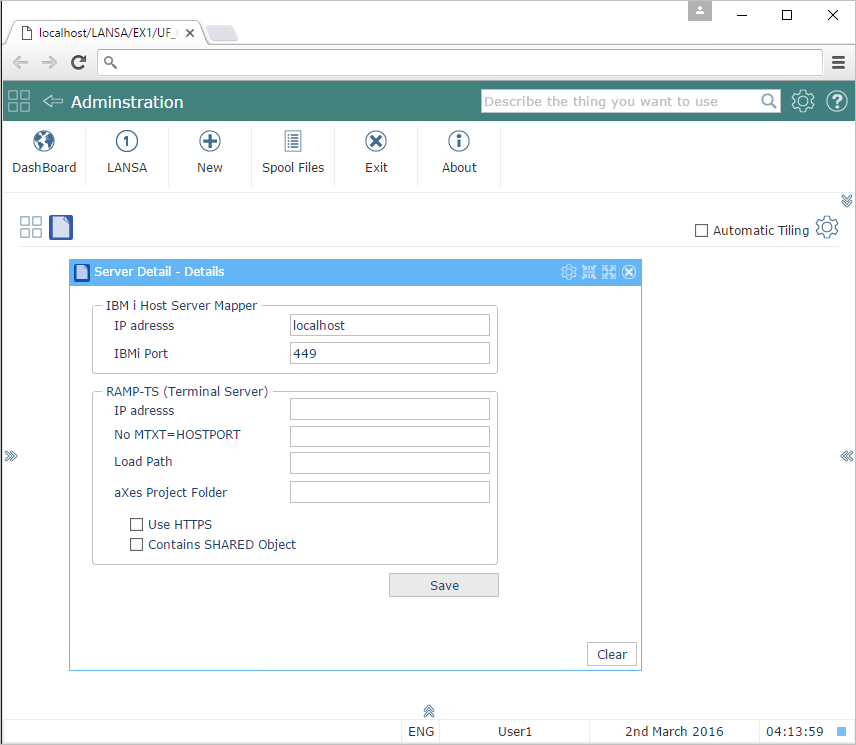
- Server Details ビジネス・オブジェクトを選択します。
- リモート・サーバーの名前とポート番号を入力して、保存します。これは、ユーザー関連の情報が保管されている、IBM または Windows サーバーです。
- オプションで、RAMP サーバーを識別するために必要な情報を入力できます。
[ |../../index.htm#lansa/lansa048_6580.htm]