Page History
RAMPコマンド・ハンドラーにイメージを追加するには、以下のサンプル汎用コードをSHAREDオブジェクトに追加します。
| Code Block |
|---|
var SHARED =
{
/* |
[  |../../index.htm#lansa/lansa050_1050.htm]
現在地: RAMP-TSガイド > 画面の拡張 > HTMLAPI スクリプト・オブジェクト > イメージを追加する
...
------------------------------------------------- */ |
...
/* Handle clicking on a prompt image */ |
...
/* ------------------------------------------------- */ |
...
oFloatingImage : null, |
...
InsertImage : function(sBesideField,sSource,iHeight,iWidth,iHOffset,iVOffset) |
...
{ |
...
var oE = HTMLAPI.getElementbyName(sBesideField); |
...
...
if (oE == null) return; |
...
var oC = HTMLAPI.getcontainerDIV(oE); |
...
...
if (oC == null) return; |
...
...
if (this.oFloatingImage == null) |
...
{ |
...
this.oFloatingImage = oC.ownerDocument.createElement("<IMG style='position:absolute; visibility:hidden; display:none;' >"); |
...
oC.ownerDocument.body.insertAdjacentElement("beforeEnd",this.oFloatingImage); |
...
} |
...
...
this.oFloatingImage.src = sSource; |
...
this.oFloatingImage.style.pixelTop = oC.style.pixelTop + iVOffset; |
...
this.oFloatingImage.style.pixelLeft = oC.style.pixelLeft + oC.style.pixelWidth + iHOffset; |
...
this.oFloatingImage.style.pixelHeight = iHeight; |
...
this.oFloatingImage.style.pixelWidth = iWidth; |
...
this.oFloatingImage.style.visibility = "visible"; |
...
this.oFloatingImage.style.display = "inline"; |
...
...
return; |
...
}, |
また、新しい行を標準のレイアウト・ファンクションに追加して、新しい画面が到着する際にイメージが消去されるようにします。
| Code Block |
|---|
ApplyStandardLayout : function(aPromptFields) |
...
{ |
...
/* Drop any floating images left around from before */ |
...
if (this.oFloatingImage != null) { this.oFloatingImage.style.visibility = "hidden"; this.oFloatingImage.style.display = "none"; } |
これで、すべての RAMP-TS 5250 画面に独自の完全にジェネリックな InsertImage 機能が追加されました。次の行を画面の到着スクリプトに追加して試してみます。
| Code Block |
|---|
SHARED.InsertImage("SURNAME","/ts/skins/images/TestImage1.gif",123,100,90,0); |
...
以下のような結果が得られます。
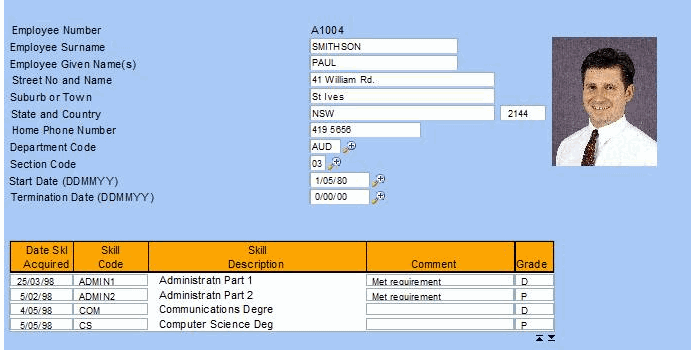
これで SHARED.InsertImage() をアプリケーション内のどこでも再利用することができます。Axes フォルダの新しいファイルに対する権限を正しく設定することを忘れないでください。
また、イメージ用の新しいコマンド・ハンドラー・タブを追加すると、迅速で簡単なソリューションになることも頭に入れておいてください。
[ |../../index.htm#lansa/lansa050_1050.htm]