Page History
...
- This WebRoutine will support display, update and delete of the selected Section record. Consider the logic that needs to be supported by this WebRoutine.
...
- What fields and lists need to be mapped?
...
- How to control the code to be executed each time this WebRoutine is invoked?
...
- What work fields will be required to retain key values?
...
- Whether to transfer control back to the Begin WebRoutine after a successful update or deletion?
- Whether to transfer control back to the Begin WebRoutine after a successful update or deletion?
...
- At the WAM level, define a work field and a Group_by statement.
...
- Define a work field, SECTW based on field SECTION. This will retain current value of SECTION.
...
- Define a Group_by, SEC_DETL for all fields in the file SECTAB. Fields DEPTMENT and SECTION should have a display attribute of *output.
- Define a Group_by, SEC_DETL for all fields in the file SECTAB. Fields DEPTMENT and SECTION should have a display attribute of *output.
...
- Create a Details WebRoutine based on the outline following:
- Map for *both the Group_by for Section fields and fields DEPT_IN and SECTW. Fields DEPT_IN and SECTW should be hidden fields.
- Use field STDRENTRY to determine why the WebRoutine was called.
- When called initially, fetch the Section record and save department and section code in work fields.
- When called for update, set up department and section code from work fields and update the record.
- If the update is successful, output a message and transfer to
...
- the Begin WebRoutine. Consider how the Begin routine should redisplay Sections for current department.
- Output a message if the update is not successful.
- When called for delete, set up department and section code from work fields, delete the record, if successful, output a message and transfer
...
- to Begin WebRoutine.
- Output a message if the delete is not successful.
...
Your complete code for
...
- the Details WebRoutine should look like the following:
...
WebRoutine Name(Details)
...
Desc('
...
Section Details')
     Web_
...
Map For(*BOTH)
...
Fields(#SEC_
...
DETL (
...
#SECTW *HIDDEN)
...
(#dept_
...
in *hidden))
...
Case Of_Field(#STDRENTRY)
...
     * Initial call from clickable image
     When Value_Is(=
...
 S)
     Fetch Fields(#SEC_DETL)
...
From_File(SECTAB)
...
With_Key(#dept_
...
in #SECTION)
     #dept_
...
in :=
...
 #DEPTMENT
     #SECTW := #SECTION
     * Update button clicked
     When Value_Is(=
...
 U)
     * ensure that DEPTMENT and SECTION can be redisplayed if a validation error occurs
     #DEPTMENT := #dept_in
     #SECTION := #SECTW
     Update Fields(#SEC_DETL)
...
In_File(SECTAB)
...
With_Key(#dept_
...
in #SECTW) Val_Error(*NEXT)
     If_
...
Status Is(*OKAY)
...
     #STDRENTRY := L
     Message Msgtxt('Section changed')
     Transfer Toroutine(BEGIN)
     Else
     Message Msgtxt('Error occurred on update')
     Endif
     * Delete button clicked
     When Value_Is(= D)
     Delete From
...
_File(SECTAB)
...
With_Key(#dept_
...
in #SECTW) Val_Error(*NEXT)
     If_
...
Status Is(*OKAY)
...
     #STDRENTRY := S
     Message Msgtxt('Section deleted')
     Transfer Toroutine(BEGIN)
     Else
     Message Msgtxt('Error occurred on deletion')
     Endif
     Endcase
     Endroutine
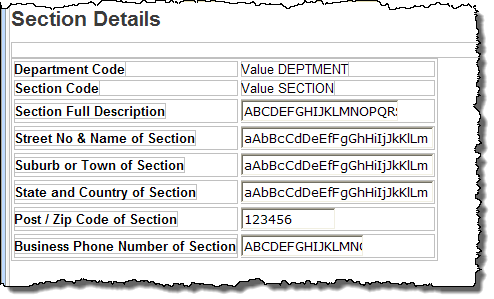
- Recompile your WAM and open the Design view for the Details WebRoutine. Your page should look like the following:
...
- If the Department and Section code fields have a combo box field visualization weblet defined in the Repository, select each of them and use the context menu to Replace with output field. Fields with a visualization weblet defined, will not display on the page in "output" mode.
...
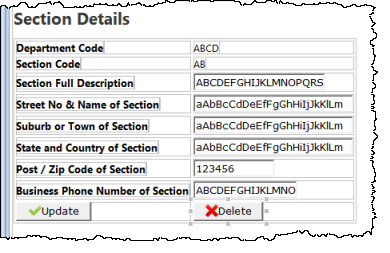
- Use the context menu to Add a row to the bottom of the table, and drop a Push Button with Image into each cell.
...
- Set up the push button properties based on the following:
Property
Value
caption
Updateleft_relative_image
icons/normal/16/check_mark_16.pngon_click_wrname
DetailssubmitExtraFields
Field Name: STDRENTRY
...
Literal Value: Ucaption
Deleteleft_relative_image
icons/normal/16/cross_16.pngon_click_wrname
DetailssubmitExtraFields
Field Name: STDRENTRY
...
Literal Value: D
...
The left_relative_image and submitExtraFields properties should be selected using the Ellipsis button and the Design of… dialog.
...
- Save your web page design.
...
- Your completed design should look like the following:
...
- Re-test your WAM. Check what happens on a successful update or delete. Check what happens after an update with a validation error.