Page History
WAM060 - Employee Maintenance using Advanced Weblets
In this step you will replace the Date Acquired column in the employee skills list (EMPSKLS) with field STD_DATEX. This is a Date type field and has a default visualization of a Date Picker weblet.
| Note |
|---|
Note: The default Date Picker visualization for field STD_DATEX will be automatically implemented when the field is included on the page, or is a column in a simple list weblet. |
When used as a column in the Grid weblet the default visualization is not recognised and you will need to add the jQuery UI DatePicker weblet to this column. 1. Change
- Change the definition of working list EMPSKLS as shown:
...
- Changes are shown in red.
Def_List Name(#empskls) Fields(#SKILCODE #GRADE #COMMENT #std_datex (#dateacqr *hidden) (#empno *hidden) (#dateacq *hidden)) Type(*Working) Entrys(*max)Note Note: The virtual field DATEACQ will still be required in the list to update the employee skills record. The real field DATEACQR cannot be used for update.
...
- In WebRoutine Details, when the employee skills list is populated, set up field STD_DATEX with the value of field DATEACQ:
...
- Changes are shown in red.
When (= D)#tabindex := '1'Fetch Fields(#empdata) From_File(pslmst) With_Key(#empno)Clr_List Named(#empskls)Select Fields(#empskls) From_File(pslskl) With_Key(#empno)#std_datex := #dateacq.asdate(
...
 SYSFMT6 )
Add_Entry To_List(#empskls)
Endselect
...
- When a new list entry is added for insert, set up field STD_DATEX using current date, and give GRADE a default value (see Step 9. Change Grade to a Dropdown list (Optional)).
...
- Changes are shown in red.
When (= N)#tabindex := '2'#skl_list := *default#std_datex := #std_datex.
...
Now
#grade := P
Add_Entry To_List(#empskls) After(*START)
Message Msgtxt('Complete new skill in top row')
...
- When employee skills are updated, set up field DATEACQ:
...
- Changes are shown in red.
When (= S)#tabindex := '2'Selectlist Named(#empskls)#dateacq := #std_datex.asnumber( DDMMYY )If (#dateacqr *NE *zeroes)Update Fields(#empskls) In_File(pslskl) With_Key(#empno #skilcode) Val_Error(*next)If_Status Is_Not(*okay)Message Msgtxt('Errors occurred on skills updates')
...
EndifElseInsert Fields(#empskls) To_File(pslskl) Val_Error(*next)If_Status Is_Not(*okay)Message Msgtxt('Insert failed')
...
ElseMessage Msgtxt('Skills for ' + #empno + ' were changed')EndifEndifEndselect
...
- At the top of the program, override the column heading for STD_DATEX, with the following:
Override Field(#std_datex) Colhdg('Date' 'Acquired' '')
...
- Compile your WAM.
...
- Open the Details WebRoutine in the Design view and select the Skills tab.
...
- With the Tab Pages weblet selected, change its content_width
...
- to 600px, so that the new date column will be visible in the Design view.
- to 600px, so that the new date column will be visible in the Design view.
...
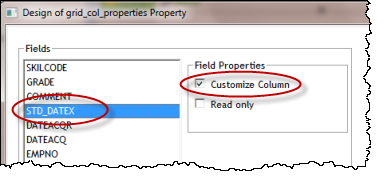
- Select the grid. Open the Design of… dialog using the ellipsis button for the grid_column_properties value. Select Customize Column for field STD_DATEX and click OK.
...
- On the Weblet Templates tab, select jQuery UI in the dropdown. Drop a jQuery UI Datepicker weblet into the new Date Acquired column.
...
- With the jQuery UI Datepicker selected, on the Details tab, change the dateFormat to dd/mm/yyyy (or use the format suitable for your region).
...
- Select the Details tab page and save your changes.
...
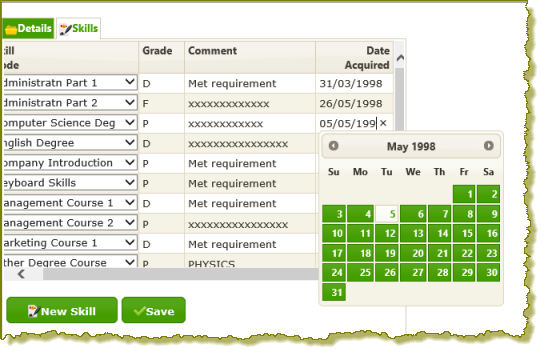
- Retest your WAM. Date Acquired in the Skills grid will now be displayed in dd/mm/ccyy format. Selecting a Date Acquired will display the calendar prompt.
...
- Change a Date Acquired and Save the changes. Redisplay the employee skills to show the date was updated correctly.
...
- Add a new skill. The Date Acquired column should initially contain current date.