Page History
WAM085 - Enhancing the User Interface
This WAM will use the new fields that you have just created. It will also build on the previous exercise, by enabling session management and saving a working list of each set of data entered.
This WAM will operate as follows:
- Executes WebRoutine begin to start session management and transfers to the select WebRoutine.
- The select WebRoutine requests input of an employee number. The showpage WebRoutine is invoked via a push button.
- The select WebRoutine also supports a push button to clear the saved list (SAVLIST).
- The select WebRoutine includes a push button to invoke the showlist WebRoutine.
- The showpage WebRoutine fetches employee data and displays all fields (except employee number) for input
- A Save button invokes the showpage WebRoutine to save the data to the working list SAVLIST and transfers back to the select WebRoutine.
- The showlist WebRoutine loads the saved list (SAVLIST) into the list EMPLIST and displays this list.
...
- Create a new WAM:
Name: iiiEnhancedUI
Description: Enhancing the Interface
Layout weblet: iiilay01
...
- Create the following four WebRoutines:
* Start session and transfer
...
 to select
     Webroutine Name(begin) Onentry(*sessionstatus_none)
     Endroutine

     * Request an
...
 employee number
     Webroutine Name(select) Desc('Select an Employee')
     Endroutine

     * Fetch employee and
...
 accept input
     Webroutine Name(showpage) Desc('Enter employee details')
     Endroutine

     * Display the saved
...
 working list
     Webroutine Name(showlist) Desc('Saved list of employee data')
     Endroutine
...
- Note that the begin WebRoutine has an onentry() keyword of *sessionstatus_none. This will be the first WebRoutine executed to start session management.
...
- Use the F7 key to display the WAM properties on the Details tab and enable session management:
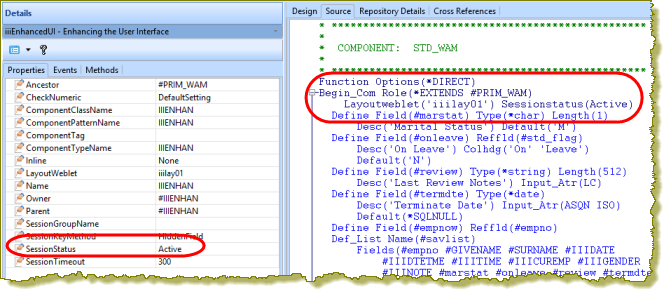
...
- Save your changes.