Page History
...
- Create a new WAM:
Name: iiiTestLayout
Description: Test layout iii_layout
Layout weblet: iii_layout
...
- Add the following RDMLX code after the Begin_com and compile the WAM.
...
Define Field(#empnow)
...
 Reffld(#empno)
     Def_
...
List Name(#empskills)
...
 Fields(#SKILCODE #GRADE #COMMENT #DATEACQ #GRADEDES) Type(*Working)
     Web_
...
Map For(*both)
...
Fields((
...
#stdrentry *hidden))
...
Webroutine Name(begin)
...
Desc('
...
Employee Details and Skills')
     Web_
...
Map For(*both)
...
Fields((
...
#EMPNO *out)
...
#SURNAME #GIVENAME #ADDRESS1 #ADDRESS2 #ADDRESS3 #POSTCODE #PHONEHME #PHONEBUS #DEPTMENT #SECTION #SALARY #STARTDTE #TERMDATE #empskills (#empnow *hidden))
...
Case (#stdrentry)
...
When (=
...
 U)
     #empno := #empnow
     Update Fields(*all)
...
In_File(pslmst)
...
With_Key(#empno)
...
     Otherwise
     Select Fields(*all)
...
From_File(pslmst)
...
     Leave
     Endselect
     #empnow := #empno
     Clr_List Named(#empskills)
     Select Fields(#empskills) From_File(pslskl)
...
 With_Key(#empno)
     Add_
...
Entry To_List(#empskills)
...
     Endselect
     Endcase
Endroutine- Open the begin WebRoutine in the Design view.
- Add a
...
- column to the employee fields table.
- column to the employee fields table.
...
- Drop a push button into the top of the new column
...
- Remove the place holder characters.
...
- Select the push button and set up its properties as:
Property
Value
Caption
SaveOn_click_wrname
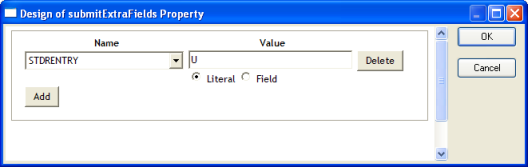
BeginsubmitExtraFields
Field Name: STDRENTRY
...
Literal Value: U
...
- Complete the submitExtraFields property using the Ellipsis button:
...
- Save your changes.
...
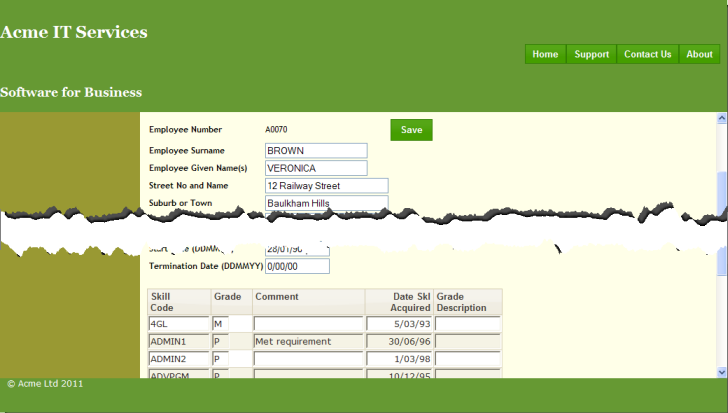
- Execute the WAM in the browser. Your web page should look like the following:
...
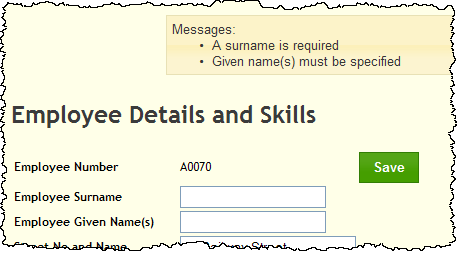
- Clear the surname and given name fields and click the Save button. Validation errors should be displayed in the messages weblet at the top of the content area, as shown:
...
- Try out the menu bar. Notice that the menu items appearance changes for hover and selection. This is controlled by the theme style sheet defined by the external resource XWT08L101.