Page History
The anchor weblet provides a hyperlink (or anchor) control. It broadly corresponds to the <a> (anchor) HTML element that designates the destination of a hypertext link.
...
アンカー・ウエブレットはハイパーリンク(あるいはアンカー)コントロールを提供します。ハイパーテキストのリンク先を指定する、<a>(anchor)HTMLエレメントとほぼ同じ働きをします。
アンカー・ウェブレットは、リンクを示すイメージやテキスト、またはこの両方を表示でき、リンク起動時のWAMの移動先を指定できます。
このイメージやテキストは静的(ウェブレットのプロパティでリテラルとして指定)なものでも、指定のフィールド、システム変数、複数言語変数により決定されるものでも構いません。
宛先は、URL(例えば、http:/lansa//www.yourcompany.com/)
...
や、実行するWAMやWebroutine、もしくは任意でWebroutineに値を渡すフィールドを指定することもできます。
アンカー・ウェブレットは以下のように表示されます。(部門コード)
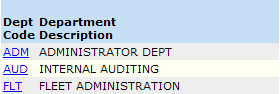
アンカー・ウェブレットはリスト内のフィールドやカラムで使用されることが多く、簡単にしかも早く項目を選択したり、項目に関係するアクションを開始したりできるようにします。上記の例では、部門コードがアンカーになっています。部門コードをユーザーがクリックすると、別のWebroutineが呼び出され、その部門の明細を表示します。currentrowhfieldとcurrentrownumvalプロパティで、該当する部門コードがこのWebroutineに渡されるように指定します。
The anchor weblet looks like this (the department codes):
The anchor weblet is frequently used with a field or a column in a list to provide a quick and easy way to both select an item and initiate an action concerning that item. In the example above, the department codes have been made into anchors. When the user clicks a department code another webroutine is invoked that displays details for the corresponding department. The currentrowhfield and currentrownumval properties specify that the corresponding department code is passed to that webroutine.