Page History
表示するペイン一式およびそのプロパティを指定するXMLノードセット
これは、アタッチメント・パネルをデザインビュー上にドラッグした時に、システムにより生成される値です。設定はデザイナでのみ可能です。デザイナを呼び出すには、プロパティ・シートの省略記号(...)のボタンを使用してください。
デフォルト値
document(“
An XML node set specifying a set of panes to show and their properties. This is a system generated value set up when you drag the attachment panel onto the design view. Can only be set by the designer. To invoke the designer use the ellipse button in the property sheet.
Default value
...
)/*/lxml:data/lxml:panes[@id=
...
’<unique id>
...
’] (一意の識別子unique idが自動的に生成された現在のペインです。)
有効値
適用不可(この値はシステムにより保守されます。)
デザイナを呼び出すには、プロパティ・シートの省略記号(...)のボタンを使用してください。
例
プロパティの省略記号(...)のボタンを使って、デザイナを開きます。
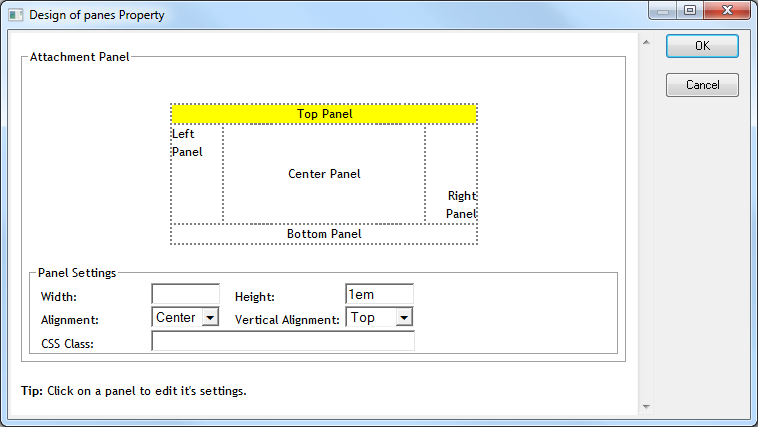
デザイナにより、各ペインの次のプロパティが編集できます。
- [Width]/[Height]:有効なCSS値でなければなりません。
- [Alignment]/[Vertical alignment]:有効な値はドロップダウンに表示されます。
- [CSS Class]:ペインに適用するCSSクラスです。
Valid values
Not Applicable. (This value is system maintained.) To invoke the designer use the ellipse button in the property sheet.
Example
Use the ellipse button on the property to open the designer:
The designer allows the following properties to be edited for each pane:
- Width/Height: You must supply a valid CSS length value
- Vertical/Horizontal alignment: Valid values are displayed in a dropdown CSS Class: A CSS class to apply to the pane.