Page History
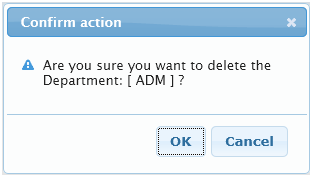
trueの場合、アクションを続行する前にユーザーに確認ダイアログボックスを表示します。ユーザーが確認ダイアログボックスで[キャンセル]ボタンをクリックする、または[OK]をクリックせずに確認ダイアログボックスを閉じた場合、ウェブレットにより実行されるアクションはキャンセルされます。
デフォルト値
false() –確認ダイアログボックスは表示されません。
有効値
true()、false() もしくは有効な式
例
以下は[削除]ボタンに追加する確認ダイアログボックスの表示例です。
If true, it presents a confirmation dialog box for the user to confirm the action before proceeding. If the user clicks on the Cancel button in the confirmation dialog box or closes the confirmation dialog box without clicking on the OK button, the action to be performed by the button weblet is cancelled.
Default value
false() –No confirmation dialog box.
Valid values
true(), false() or a valid expression.
Example
...