Page History
...
チェックボックス・ウェブレットはチェックボックス・コントロールを提供します。これは広い意味でHTMLエレメントの<input type="checkbox"
...
>に相当します。
チェックボックス・コントロールは、通常2つの状態の1つを表わす際に使用されます。例えば、オン/オフ; はい/いいえ; 選択/非選択などです。
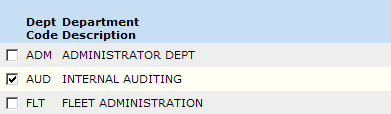
リスト(キャプションなし)で使用される時は、チェックボックス・ウェブレットは次のようになります。
A checkbox control is typically used to represent a value that can have one of two states. For example: on or off; yes or no; selected or unselected.
When used in a list (with no caption), the checkbox weblet looks like this:
| Note |
|---|
| Info |
| Note: While the checkbox weblet includes properties such as 注意:チェックボックス・ウェブレットがクリックされた時に他のWebroutineに移動する on_click_wrname that allow it to navigate to another webroutine when clicked, It is not good user-interface design practice to initiate actions from the click of a checkbox. Devices such as a push button, menu item or anchor (hyperlink) should be used to accomplish this. |
...
などのプロパティが含まれる場合、チェックボックスのクリックからアクションを開始するのは、あまり良いユーザー・インターフェースの設計方法ではありません。このような場合は、プッシュ・ボタン、メニュー・アイテム、アンカー(ハイパーリンク)などのデバイスを使用してください。 |