Page History
ウェブレットに表示する項目を指定するXMLノード・セット
設定はデザイナでのみ可能です。デザイナを呼び出すには、プロパティ・シートの省略記号(...)のボタンを使用してください。項目がlistnameプロパティに指定されたリストから追加される場合は、ブランクにしてください。
デフォルト値
document(“
An XML nodeset specifying the items to appear in the weblet. Can only be set by the designer. To invoke the designer use the ellipse button in the property sheet. Leave blank if items are populated from a list specified in the listname property.
Default value
...
)/*/lxml:data/lxml:select (
...
Valid values
Not Applicable. (This value is system maintained.) To invoke the designer use the ellipse button in the property sheet.
Example
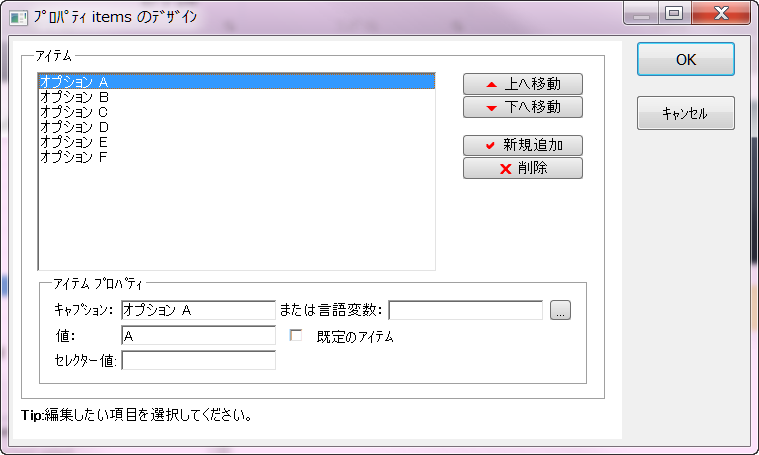
This example shows the item's property editor:
...
このウェブレットに項目が何も定義されていないことを示します。)
有効値
適用不可(この値はシステムにより保守されます。)
デザイナを呼び出すには、プロパティ・シートの省略記号(...)のボタンを使用してください。
例
次の例ではitemのプロパティ・エディターが示されています。
ここではリストは6つの項目から構成されています。値が事前に選択されていない時に選択された状態にする項目には[規定のアイテム]のチェックボックスを使用します。セレクター値を使って、実行時にリストをフィルターして表示する値を絞ることもできます。