Page History
次の例では従業員リスト内の部門のカラムにコンボ・ボックスを追加します。#DEPTMENTカラムを含む#EMPLISTと呼ばれる従業員リストと#DEPTMENTと#DEPTDESCを含む#DEPTSとよばれる部門リストがあります。
- グリッドをWebroutineの[デザイン]に追加し、listnameプロパティにEMPLISTを設定します。
- grid_col_propertiesプロパティを修正し、DEPTMENTカラムで[カラムのカスタマイズ]オプションを選択します。
- コンボ・ボックス・ウェブレットをDEPTMENTカラムの最初のヘッダー以外のセルにドラッグしてください。
- ドロップダウンのlistnameプロパティにDEPTSを設定します。
- codefieldプロパティにDEPTMENTを、captionfieldプロパティにDEPTDESCを設定します。グリッドは、以下のようになります。
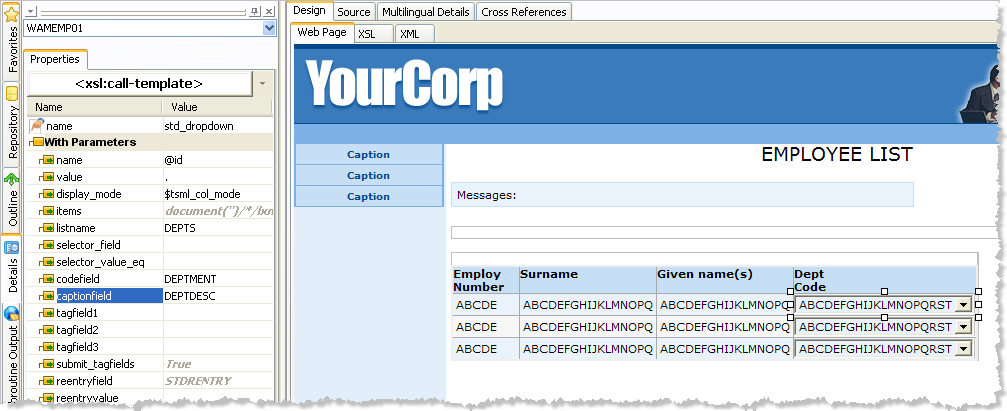
これで、on_changeアクションがコンボ・ボックスに追加され、値が変更されるとWebroutineが実行されます。UpdateDepartmentWebroutineには2つの入力があります。EMPNOとDEPTMENTです。Info valueプロパティにシングル・ピリオド(.)が含まれていることに注意してください。これはコンボ・ボックスの値がEMPLISTリストの現在のカラム値であるべきことを示しています。
また、display_modeプロパティには$tsml_col_modeが設定されていることにも注目してください。これは特別なXSLT変数で、グリッドの中でDEF_LISTに定義された表示モードを示すために使用されます。 - コンボ・ボックスのon_change_wrnameプロパティにUpdateDepartmentを設定します。
- コンボ・ボックスのtagfield1プロパティにDEPTMENTを設定します。これはDEPTMENTカラム(DEPTSリスト内の)で選択された値を実行するようコンボ・ボックスに指示します。
This example adds a combo box to the Department column in a list of employees. It assumes an employee list called #EMPLIST containing a #DEPTMENT column and a department list called #DEPTS containing #DEPTMENT and #DEPTDESC.
- Add a grid to the Webroutine design and set its listname property to EMPLIST.
- Modify the grid_col_properties property and select the Customize Column option for the DEPTMENT column.
- Drag a combo box weblet onto the first non-header cell of the DEPTMENT column.
- Set the listname property of the dropdown to DEPTS.
Set the on_change_wrname property of the combo box to UpdateDepartment.
Set the tagfield1 property of the combo box to DEPTMENT. This tells the combo box to submit the selected value of the DEPTMENT column (in the DEPTS list).
Set the reentryfield property of the combo box to EMPNO and set the reentryvalue property to - コンボ・ボックスのreentryfieldプロパティにEMPNOを設定し、reentryvalueプロパティに
- ../lxml:column[@name='EMPNO' ]. As this is an XPath expression you must use the XPath entry area at the bottom of the details tab to enter the value. This tells the combo box to get the value of the EMPNO column of the grid and submit it in a field called EMPNO.
- ]を設定します。これはXPath式ですので、値を入力する際は[詳細]タブの下部にあるXPathエントリー・エリアを使用する必要があります。これはグリッドのEMPNOコラムの値を取得し、EMPNOという名前のフィールドに送るようコンボ・ボックスに指示します。
Set the codefield property to DEPTMENT and the captionfield property to DEPTDESC. Your grid should be looking something like this:
Notice, also, that the display_mode property is set to $tsml_col_mode. This is a special XSLT variable used inside the grid to indicate the display mode defined in the DEF_LIST.
Now an on_change action will be added to the combo box to execute a Webroutine when a value is changed. The Webroutine, UpdateDepartment, takes two inputs: EMPNO and DEPTMENT.