Page History
以下では複数選択が可能なリスト・ボックスの例で、その結果を生成する際に使用されるテクニックが説明されています。
リスト・ボックスで単一選択のみの場合は、
Following is an example of a list box with multiple selections plus a description of the techniques used to produce this result.
If you require only single selection in your list box, you should refer to the description of the allow_multi_selections and related properties.、およびそれに関連するプロパティの説明を参照してください。
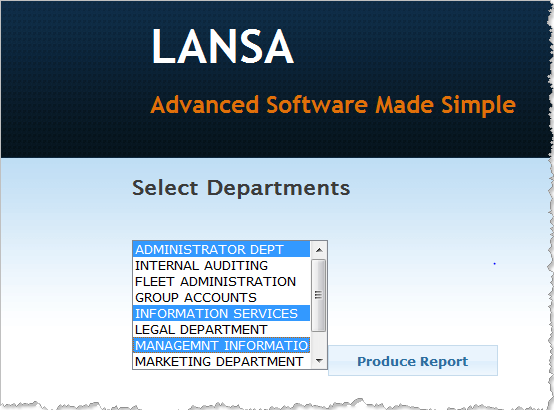
The list box allows for multiple selections (via the standard Windows method of holding down the Shift or Ctrl keys when making selections). The 'Produce Report' button, when clicked, passes the selected entries into the WAM for processing.
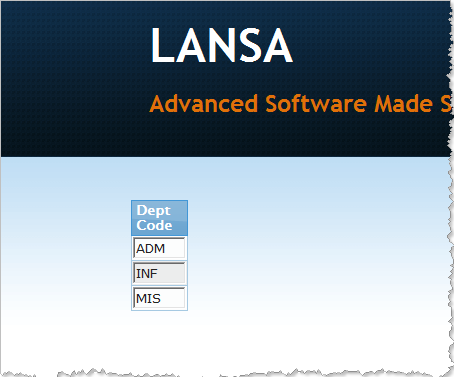
Change the items selected in the list box and click the 'Produce Report' button. You will see a list of the selected entries in a list, similar to the following:
The List Definitions
Two lists are required to code the multi-select list box:

The first, #ListBox, drives the content of the list box. It will usually have two fields in it: a code field and a description field.
The second list, #Selected, has two uses. Entries can be added to it in the WAM to cause #ListBox entries to be pre-selected when the list box is displayed. It is also used to return the entries selected by the user to the WAM.
If you right-click on the ShowPage Webroutine and open it in the LANSA Editor, you'll see the list box and the push button. Click on the list box and display its properties by clicking on the Details tab:
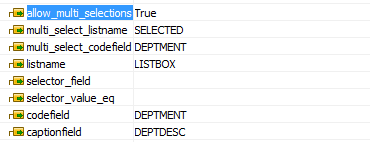
The allow_multi_selections setting is self-explanatory: true() means that multi-selections are enabled, whilst false() ensures that only single selection is permitted.
- The listname property holds the name of the working list used to populate the list box.
- The codefield property is the name of the field in the listname list that holds the code value of the list entry (in this case, department code).
- The captionfield property is the name of the field to be displayed in the list box (in this case, department description).
These entries are sufficient to get the list box populated and onto the web page.
The remaining two properties relate to the selection of entries in the list box:
- The multi_select_listname property contains the name of the list that is to return the selected entries to the WAM.
- The multi_select_codefield property is the name of the field in that list that is to hold the code value of the selected entry.
Building the Main List
Look at the ShowPage Webroutine in the source editor again:
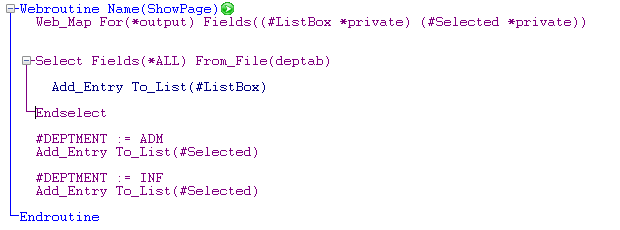
Note the Web_maps for the two list box-related lists.
A simple Select loop is used to add all departments from the DEPTAB file to the main list, #ListBox.
Then, two entries are added to the #Selected list. This will pre-select the Administration and Information Systems departments in the list box when it's displayed.
Processing the Selected Entries
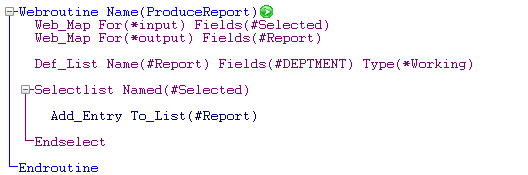
The ProduceReport Webroutine is invoked by the push button on the web page:
このリスト・ボックスは複数選択が可能です。(ShiftもしくはCtrlキーを押して複数選択するいう標準的なWindowsの方法を使用)[Produce Report]ボタンがクリックされると、選択したエントリーがWAMに送られ、処理されます。
リスト・ボックスで選択された項目を変更して、[Produce Report]ボタンをクリックします。すると、次のようなリスト内で選択された項目のリストが表示されます。
リスト定義
次の2つのリストを複数選択のリスト・ボックスとしてプログラムする必要があります。
1つめは、#ListBoxで、リスト・ボックスのコンテンツを操作します。これには通常2つのフィールド、つまりコード・フィールドと記述フィールドが含まれています。
2つめのリストは、#Selectedで、2通りの使用方法があります。WAM内のこのリストにはエントリーが追加され、リスト・ボックスが表示される時に#ListBoxのエントリーが事前に選択されているようにします。またこのリストは、ユーザーが選択したエントリーをWAMに返す際にも使用されます。
LANSAエディターのShowPageWebroutineで右クリックすると、リスト・ボックスとプッシュ・ボタンが表示されます。リスト・ボックスをクリックし、[詳細]タブをクリックしてそのプロパティを表示してください。
allow_multi_selectionsはその名の通り複数選択許可を指定するもので、true() は複数選択が可能、そしてfalse() は単一選択のみ可能であることを示します。
- listnameプロパティには、リスト・ボックスにデータを追加する際に使用する作業リスト名を指定します。
- codefieldプロパティはリスト・エントリーのコード値を保持するlistnameリスト内のフィールド名です。(この場合、DEPTMENT 部門コード)
- captionfieldプロパティはリスト・ボックスに表示されるフィールド名です。(この場合、DEPTDESC 部門記述)
これらのエントリーが揃えば、リストボックスにデータを追加しウェブ・ページに表示することができます。
残りの2つのプロパティはリスト・ボックスのエントリーの選択に関係しています。
- multi_select_listnameプロパティには、選択されたエントリーをWAMに返すリストの名前を指定します。
- multi_select_codefieldプロパティは選択されたエントリーのコード値を保持するフィールド名です。
メインリストの構築
ソース・エディターでShowPageWebroutineをもう一度見てください。
Web_mapに、リスト・ボックスに関連した2つのリストがあることに注意してください。
Selectループを使用して、DEPTABファイルから全部門がメインリストである#ListBoxに追加されます。
それから、2つのエントリーが#Selectedリストに追加されます。これにより、表示する際リスト・ボックスで管理部と情報システム部が事前選択されます。
選択されたエントリーの処理
ProduceReportWebroutineはWebページ上のプッシュ・ボタンを押した時に呼び出されます。
ここでもWeb_mapに注目してください。選択されたエントリーの入力リスト(#Selected)と、もうひとつ、出力リスト(#Report)です。これらを使用して、選択された部門をリスト表示します。Again, note the Web_maps: the incoming list of selected entries (#Selected) and another, outgoing list (#Report). These are used to display a list of selected departments.