Page History
メニューバー・ウェブレットはメニューバー機能を提供し、Webroutineを含んだ別のWebページを呼び出せるようになります。メニューバーは水平あるいは垂直に調整でき、最上位のメニュー・アイテムはマウスがその上に移動すると、更に次のメニューをポップアップします。水平に調整されたメニューバーは次のようになります。- この例では、2つのレベルのポップアップ・メニューが表示されています。
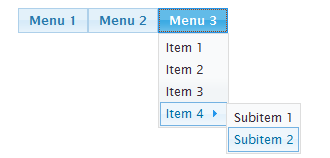
メニュー・アイテムは、メニュー・アイテムでデザイナを使用してWebroutineの設計時に定義するか、または実行時にRDMLXリストとして提供します。このウェブレットはjQuery UIメニュー・ウィジェットをベースにしており、操作にはjQueryおよびjQuery UIが必要です。(ウェブレットは自動的に必要な外部リソースをHTML出力に追加します。)
...
...
Using a List to Define the Menu
The menu bar weblet provides the functionality of a menu bar that can invoke other web pages including other webroutines. The menu bar can be arranged horizontally or vertically and the top level menu items can cause further menus to pop-up as the mouse moves over them. This is what the menu bar weblet looks like when arranged horizontally – in this example, two levels of popup menu are shown.
The menu items can be defined in the Webroutine design using the menu item designer or they can be supplied at runtime in an RDMLX list. The weblet is based on the jQuery UI menu widget and requires jQuery and jQuery UI to operate (the weblet will automatically add the required external resources to the output HTML).