Page History
...
...
The Prompter weblet provides a mechanism through which a user can select a value for a field, or fields, using a custom user interface presented in a pop-up panel.
The weblet creates a button like this:

プロンプター・ウェブレットは、ユーザーがポップアップ・パネルのカスタム・ユーザー・インターフェースを使って、1つもしくは複数のフィールドの値を選択できるメカニズムを提供します。
ウェブレットは次のようなボタンを作成します。
これをクリックすると、プロンプターがWebroutineを呼び出し、出力を次のようなパネルに表示します。
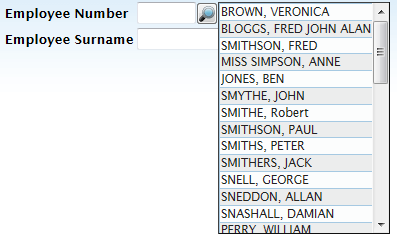
このWebroutineは別のWebroutine、例えばリスト内のページやウィザードのステップなど、を呼び出すこともできます。最終的な値が決定すると、"終了"Webroutineとして知られる、事前定義されたWebroutineに出力します。プロンプターはこの終了Webroutineを認識し、値を現在のページにコピーして終わります。プロンプターの終了およびその結果へのアクセスについての詳細は、「closing_wrname」、「field_mapping」、そして「
When clicked, the prompter will call a webroutine and display its output in a panel like this:
This webroutine may call other webroutines as necessary, for example, pages in a list, steps in a wizard. When the final value is known, it is output in a predefined webroutine know as the "closing" webroutine. The prompter will recognize the closing webroutine, copy the value(s) into the current page and close. See the closing_wrname, field_mapping and field_name_to_exchange properties for more details on closing the prompter and accessing its results.」を参照してください。