Page History
You can easily modify the appearance of your Tab Pages weblets by adding a few styles to a custom stylesheet to override the defaults. For example, the following will change the border and background colors:タブ・ページ・ウェブレットの外観は、カスタム・スタイルシートにいくつかスタイルを追加してデフォルト値を上書きすることで、簡単に修正することができます。例えば、以下は枠線と背景色を変更します。
     .std_tab_pages_content_wrapper
     {
          border: 1px solid #81a594;
     }
     ul.std_tab_pages_tabs li
     {
          border: 1px solid #81a594;
          background-color: #cbcbb8;
     }
Changing the border thickness will also require changing the selected tab padding and the amount that the tabs are shifed to overlap the content. These custom styles:枠線の太さを変えると、選択されたタブの余白と、タブをコンテンツに重なるように移動する量も変更する必要があります。次のようなカスタム・スタイルがあったとします。
     .std_tab_pages_content_wrapper
     {
          border: 3px solid #81a594;
     }
     ul.std_tab_pages_tabs li
     {
          border: 3px solid #81a594;
          background-color: #cbcbb8;
     }
     .std_tab_pages_top_tabs,
     .std_tab_pages_top_tabs ul
     {
          position: relative;
          top: 3px;
     }
     .std_tab_pages_top_tabs ul li.std_tab_active
     {
          border-bottom: none;
          padding-bottom: 3px;
     }
...
これは、次のような結果になります。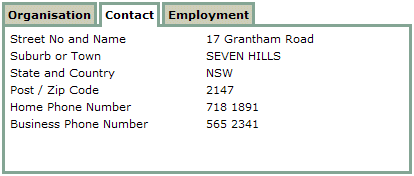
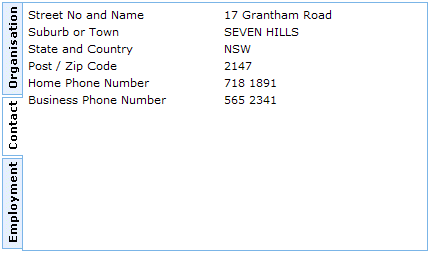
タブ・ページ・ウェブレットの以前のInternet Explorerのみのバージョンは、左または右に整列されたタブに縦にテキストが表示されるようになっています。これはInternet Explorerでのみ可能な機能のため、_v2バージョンからは削除されました。左に整列されたタブは次のようになります。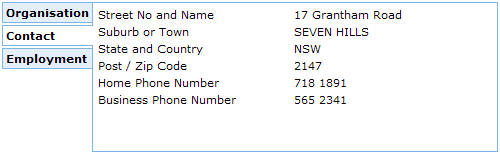
ターゲット・ブラウザがInternet Explorerの場合のみ、この効果をwriting-modeプロパティで再適用することが可能です。
...
     .std_tab_pages_left_tabs ul li a
     {
          writing-mode:tb-rl;
     }
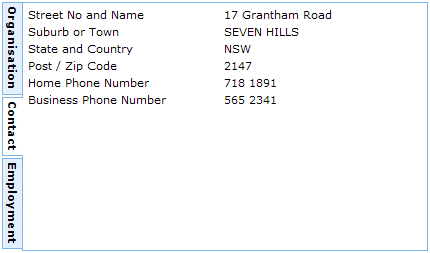
...
下から上へ記述されたテキストが必要な時は、filterプロパティを使用して180度回転させることもできます。
     .std_tab_pages_left_tabs ul li a
     {
          writing-mode:tb-rl;
          filter: flipv fliph;
     }