Page History
非階層リストでは、各エントリーは親IDを指定することで、ツリー構造内の位置をツリー・ビューに知らせます。非階層リストは、最低限次のデータを含むカラムを含んでいなければいけません。
フィールド | ツリー・ビューのプロパティ | 説明 |
|---|
In an unlevelled list each entry tells the Tree View exactly where it fits in the tree structure by specifying its parent ID. At a minimum, an unlevelled list must contain columns with the following data:
Field
Tree View Property
ID |
A unique ID string to identify the entry.
エントリーを識別する一意のID文字列 |
親ID |
The ID string of the parent entry. An empty string indicates a top level entry.
親エントリーのID文字列 空の文字列は最上位のエントリーを示します。 | |
キャプション |
The text to display for the entry.
The Tree View processes the list entries in the supplied order and cannot add an entry to a parent that doesn't exist. It is your responsibility to ensure the list is sorted so that parent items come before their children and items at the same level are in display order. One way to do that is to add a depth column and a sequence column and sort the list by depth then sequence.
For example, a working list like this:
エントリー用に表示するテキスト |
ツリー・ビューは提供された順にリストのエントリーを処理し、存在しない親にはエントリーを追加することができません。子の前に親のアイテムが来るようにリストがソートされていること、そして同じレベルのアイテムが表示順になっていることを、自身で確認する必要があります。これを行う1つの方法としては、深さを示すカラムを追加し、この深さでソートした後に順番にソートします。
例えば、次のような作業リストがあったとします。
ID | 親ID | キャプション |
|---|
ID
Parent ID
1 | Node A | |
2 | Node B | |
3 | 1 | Leaf A1 |
4 | 1 | Leaf A2 |
5 | 2 | Node B1 |
6 | 2 | Leaf B2 |
7 | 5 | Leaf B1A |
8 | 5 | Leaf B1B |
Will produce a tree like this:これは次のようなツリーになります。
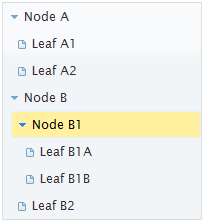
Note that, although the ID and ParentID columns contain numbers in this example, they must be text or character fields.
An unlevelled list can contain more columns that can be used to further customize the behavior or appearance of the corresponding entry.
この例ではIDと親IDのカラムに数字が含まれていますが、これらはテキストか文字列フィールドでなければいけないことに注意してください。
非階層リストに更に多くのカラムを追加して、動作や該当するエントリーの外観をカスタマイズすることもできます。
フィールド | ツリー・ビューのプロパティ | 説明 |
|---|---|---|
イメージ |
Field
Tree View Property
Description
Specifies a path, relative to the images directory, to an image to be used for the entry's icon.
イメージ・ディレクトリに関連付けられた、エントリーのアイコンに使用するイメージのパスを指定します。 |
オープン・イメージ |
Specifies a path, relative to the images directory, to an image to be used for the entry's icon when the entry is expanded.
イメージ・ディレクトリに関連付けられた、エントリーが展開された時のエントリーのアイコンに使用するイメージのパスを指定します。 | |
選択 |
Indicates that the initial state of the entry is selected. This should be a string field that will contain either nothing (not selected) or one of two values: 'true' or 'freeze'. Both values indicate that the entry is selected but differ in how the Tree View behaves. If the value is 'true' the Tree View will perform whatever action it is configured to perform when a user clicks on the entry. In other words, it simulates the user selecting the entry. If the value is 'freeze' then the Tree View draws the item as selected but performs no other action.
エントリーの最初の状態が選択された状態であることを示します。このフィールドは文字列フィールドで、何も含まれない(選択されない)か次の2つのいずれかの値が含まれます。‘true’または‘freeze’.。両方の値はエントリーが選択されることを示しますが、違いはツリー・ビューの動作です。値が‘true’ の場合、ツリー・ビューはユーザーがそのエントリーをクリックした時に行われる構成通りのアクションを取ります。つまり、ユーザーがエントリーを選択した時と同じ動作をシミュレートします。値が‘freeze’の場合は、ツリー・ビューでアイテムは選択された状態になりますが、その他は何もアクションが取られません。 |
展開 |
Indicates that the initial state of the entry is expanded. This is ignored if the entry does not have children. This field can be a string or a numeric. Values of 'true', 'y' or 1 are treated as true, all other values are treated as false.
エントリーの最初の状態が展開された状態であることを示します。エントリーに子がない場合は、無視されます。このフィールドは、数字でも文字列でも構いません。‘true’、‘y’または 1の値はtrueとして扱われ、その他全ての値はfalseとして扱われます。 | |
選択時WAM 選択時Webroutine |
アイテムがクリックされた時に呼び出されるWAM/Webroutineの名前。これらのフィールドに値が何も提供されない場合、onselect_wamnameやonselect_wrnameに指定されたデフォルト値が使用されます。 |