Page History
アタッチメント・パネル・ウェブレットはコンテンツをドロップできる5つの領域(左、上、右、中、下)を持つパネルを提供します。それぞれの領域ごとにアタッチメント・レイアウト・マネージャが存在します。この5つの領域には、コンテンツを挿入したり、他のウェブレットをドロップできます。ウェブレットをドロップすると、アタッチメント・レイアウト・マネージャのルールに従って、ウェブレットのサイズが調整されます。
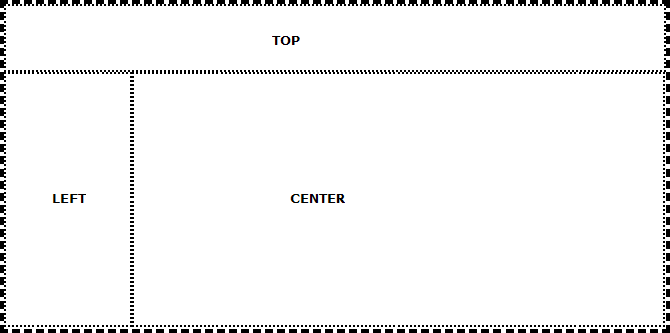
以下の例はほぼ空の状態のアタッチメント・パネルの外観を示しています。この例では、3つのアタッチメント領域のみが使用されています。太い破線で示された枠線はアタッチメント・パネルとして指定されており、細い点線の枠線で示されたパネルは3つの領域で使用されています。このサンプルでは–分かりやすいように枠線が使用されていますが、このように実線を使う必要はなく、アプリケーションでも必要ないことが多いでしょう。他のウェブレット(インプット・ボックス、チェック・ボックス、プッシュ・ボタンなど)もそれぞれのレイアウト領域にドロップできることを覚えておいてください。
一貫性があり、しかも魅力的なWebページのレイアウトの作成ができるよう提供されている多くのウェブレットの1つがアタッチメント・パネルです。水平スプリッターや垂直スプリッター、パネルとナビゲーション・パネルのウェブレットも参照してください。アタッチメント・パネルは静的なウェブレットです。つまり、ユーザーはこれが含まれるパネルのサイズ変更やサイズ調整、位置変更をすることができません。
The Attachment panel weblet provides a panel with five areas where content can be dropped: left, top, right, center, and bottom. Each of these has attachment layout manager behavior. Contents can be inserted or other weblets dropped into any of the five areas. Dropped weblets are sized according to attachment layout manager rules when they are dropped.
The following is an example of the appearance of a nearly empty attachment panel. In this example, just three of the attachment areas have been used. A thick dashed border has been specified for the attachment panel and thin dotted borders for the panels used in the three areas. The borders have been used for clarity in this example – you do not have to use visible borders and you may not wish to in your applications. Remember you can drag and drop other weblets (such as input boxes, check boxes and push buttons) onto each of the layout areas.
The attachment panel is one of a number of weblets that you can use to aid the creation of a consistent and visually appealing layout for your web pages. You may also wish to review the horizontal and vertical splitters and the panel and navigation panel weblets. This weblet (the attachment panel) is static – the user is not able to resize or otherwise manipulate the size and position of the panels that it contains.