Page History
...
Default Cross reference behavior is defined in the Default Cross Reference Options dialog opened from the Tools menu on the Deployment Tool's main window.
Each object type included in the left hand side of the Default Cross Reference Options has their own default settings. Select each object type to review the default settings.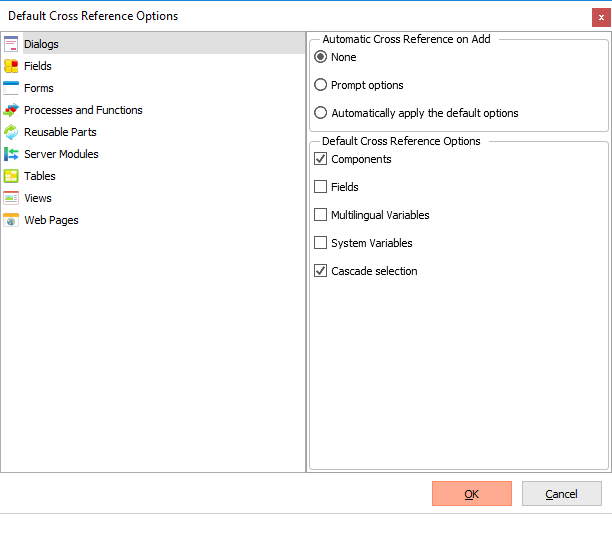
The options selected in the Automatic Cross Reference on Add section of the dialog control how the default cross reference options are displayed and applied when a package is created. These are:
None
Cross References will only be assigned for the objects included in a package if you manually select the Cross Reference icon  and options within the Package's Repository Object Selection dialog.
Prompt options
When you add objects to a package using the Repository Object Selection dialog and press OK to confirm your object selection you will be presented with Cross Reference options for each object type you have included in the package. The initial settings are defaulted based on the Default Cross Reference Options but can be modified to suit the individual package requirements.
Automatically apply the default options
The default values for the object type, as set up in the Default Cross Reference Options section of the Default Cross Reference Options dialog, will be automatically applied to any objects included in a package. The default values can still be overridden in a package by selecting the Cross Reference icon in the package's Repository Object Selection dialog and modifying the settings as required.
Default Cross Reference Options
The settings in the Default Cross Reference Options section of the dialog indicate the default settings for an object type to be applied to a Version or Patch. These settings can be overridden when editing a specific Version or Patch.
...