Page History
| A Patch is created by copying a version or a patch in an application. The copied version or patch forms the basis of the patch definition and is known as the 'parent' of the patch. The parent's version number for the patch is displayed in the list of versions and patches. Right-click a version or a patch in the Deployment Tool Main Window tree and choose Create Patch to create a patch. |

...
It is strongly recommended that a patch that includes a runtime change does not include any application changes. This makes it simpler to back out if run in the wrong order. Also, runtime changes cannot be uninstalled when there are System file CTD changes.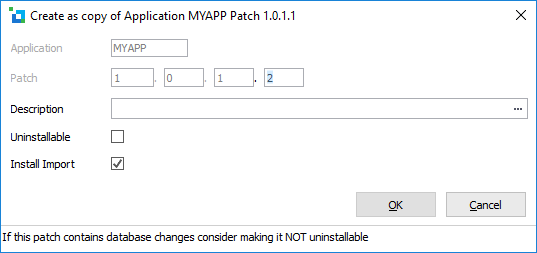
Application | The application containing this package. This value is prefilled and cannot be modified. |
|---|---|
Patch | Enter the next patch number. Patch number must increase for subsequent releases. The Patch number has a direct relationship to the version or patch it was based on, for example patch 1.0.0.1 would be the first patch against Version 1.0.0. A recommended approach for naming is: <major version number>.<minor version number>.<build number>.<patch number> |
Description | Enter a description. |
Uninstallable | Allows a patch to be uninstalled. The uninstall process will roll back the executable artefacts changed by the patch, and rollback table changes to application tables. It does not rollback changes to System tables. Special care needs to be taken with Table Data Processing options. If you do not use the default option of Exclude Data, Reload Existing then it is advisable NOT to choose Uninstallable. |
Install Import | Installs the LANSA Standard imports and the application object definitions. If a patch is Uninstallable the Install Import option cannot be selected as the associated imports cannot be uninstalled. |
...