Page History
IDERA SQL Secure Compliance Manager provides an intuitive, simple-to-use interface for license key management. You can view the status of the license keys and add licenses to audit additional instances.When you reach the SQL Server limit dictated by your license, SQL Secure will not let you add new servers. Take into account the following scenarios:
- If your trial period expires - you will be prompted for a new license when you start the SQL Secure Console.
- If a valid license is not provided - then SQL Secure will shut down and no longer be accessible.
SQL Secure requires a license for each instance of SQL Server to be audited.
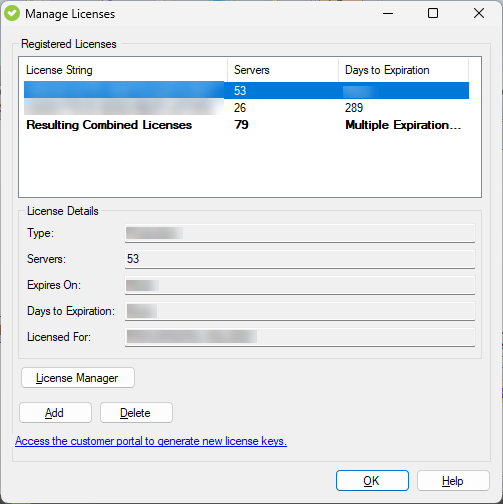
To view your License Summary, go to the Manage SQL Secure view, Repository Status window. The System Status section lists your Repository name, number of licenses, disk space, and the timestamp for the most recent grooming. In the License Summary section, SQL Secure displays bar graphs to help you compare between you number of Server Licenses, Audited Servers, and Remaining Licenses. If you have Azure SQL Databases, see SQL Secure licensing with Azure SQL Database for more information.To manage your licenses, go to the File menu, and select Manage SQL Secure licensesLicenses. In the Manage SQL Secure CM Licenses window, you can see your actual license key, the number of servers it is for, and the number of days until it expires. In the License details, you can also see the type of license you have, the exact date of expiration, and the repository for which is licensed.
Click Add to add a new license and select one of the following types:
- Perpetual license. A perpetual license allows indefinite software use.
- Term license. A term license grants access for a limited time.
When you reach the SQL CM limit dictated by your license, SQL CM will not let you add a new license keynew servers. Take into account the following scenarios:
- If your trial period expires - you will be prompted for a new license when you start the SQL CM Console.
- If a valid license is not provided, SQL CM will shut down.
- Perpetual and Term licenses co-existence - if you are running SQLCM with Perpetual licenses, you can still add new Term licenses to the CM repository.
Info title Perpetual and Term License co-existence SQLCM will continue to audit all of the registered instances, even after the Term Licenses expire.