Page History
WhereScape is pleased to announce that WhereScape RED 10.45.0.2 is now available.
This release of RED is compatible with WhereScape 3D 9.0 versions and up.
| Note | ||
|---|---|---|
| ||
| Before upgrading, review the Important Messages when Upgrading for more information. |
| Table of Contents | ||
|---|---|---|
|
...
Log into the WhereScape Support Portal to access downloads.Access the User Guide here.
New Features and Improvements
WhereScape presents RED 10.4 a new version of RED. The features implemented in this version are mainly focused on enabling 3rd party integrations with external tools like GIT, but also enhances the UI and enables the ability to add scripted workflows based on the current context in the RED UI.
Workflow Scripts
Workflow scripts, when defined, will appear in the context menu throughout the RED UI. When clicking on them in any context menu, the underlying script will be executed and provided with the complete object list contained by the context. This allows for integration scripts to be written that can perform actions on lists of objects, such as: creating deployment applications, checking items in and out of GIT, running external tests on the objects selected, exporting data to catalog tools, backing up scripts to disk and more!
The following changes have been made to support this new feature:
- A new Host Script Language category has been added for Workflow scripts:

- Host Script Objects assigned to a Workflow script type will appear in most context menus in RED and when selected will execute the script and provide a file containing the objects contained by the context:
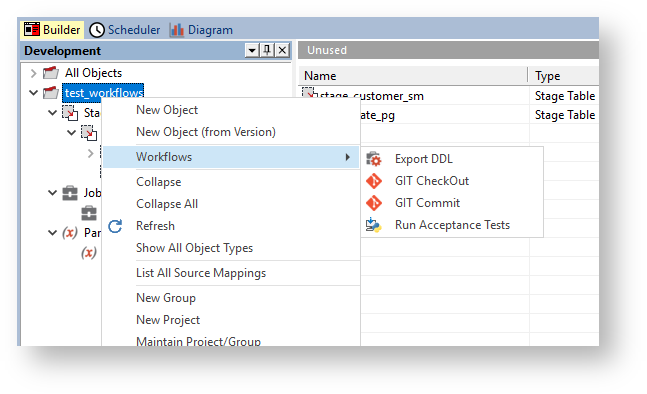
In the example results below the Export DDL script contained the example 'Print Context' script from the Workflow scripts section of the documentation.

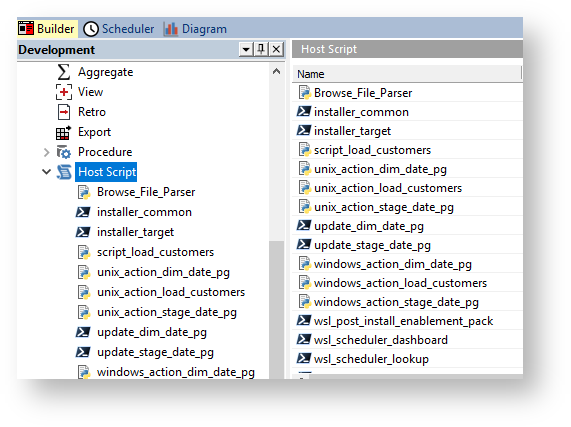
- Host Script Languages can now have specific icons assigned (via Host Script Language maintenance):
Improvements for 3rd Party Integrations
- CheckIn/CheckOut feature will now trigger execution of a script, if present, to support GIT integrations. Add script names of wsl_workflow_checkin and wsl_workflow_checkout to enable this feature.
- Added new commands to RedCli, 'object export-ddl' and 'object export-all-ddl' which generate and export create ddl from an object's associated templates.
- Added new endpoints to the RED metadata service, objectsExportByName and jobsExportByName, that export metadata in a GIT friendly format.
- Deployment Application Creation via command line now accepts a specific set of objects to deploy based on the JSON structure that RED Workflow scripts produce.
- RedCli commands on script, procedure and templates now support an 'export-all' option, useful for GIT integrations. Additionally single export allows specifying a directory for auto creation of the filename and extension for the object.
- Added Scheduler API environment variables to all script executions to support actions like releasing another job via scripts.
3D Integration - New Merge Settings for Source Mappings
When deploying Objects with multiple Source Mappings via 3D Export to RED you can now control the merge behavior when updating existing Objects Source Mapping Sets. There is now a new option with three settings when deploying from 3D to RED.
- Option: ‘Existing Source Mapping Sets will be’
- Replaced: [Default] Replaces the entire Source Mapping Set (Source Mappings can be removed in this mode)
- Merged using Application: Merges the Sets, resolving conflicts by deploying Source Mappings from this Application - Add and Update.
- Merged using Repository: Merges the Sets, resolving conflicts by retaining Source Mappings in the Repository - Add only.
This feature will be particularly useful to organizations with multiple development teams or projects affecting the same objects in RED, allowing them to deploy only the new Source Mappings that they have added and avoid deploying out-of-date changes to existing Source Mappings.
Other Improvements and Fixes
In addition to the major improvements above please see the following Detailed Changes section for the full list of customer fixes and improvements in this release.
Upgrade Process
A new scheduler upgrade wizard has been developed which streamlines the upgrade process and reduces the number of manual steps required during scheduler upgrades.
Authentication profiles are now created automatically when upgrading from a version of RED which does not include the advanced connect feature. Refer to the Upgrade on Windows guide for more information.
Installation
Metadata databases and DSN's for RED and the Azkaban Scheduler can now be created using the installation wizards, reducing the number of manual steps required during new installs. For more information refer to the metadata installation and scheduler installation guides.
Profile Maintenance
A new scheduler profile maintenance wizard has been developed with an enhanced UI. For more information refer to the Scheduler Maintenance documentation.
Increased limits
The maximum number of projects and groups can now be configured, allowing for over 1000 projects and groups in a single repository. This can be changed on the Other Options window.
Increased the character limit on FROM/WHERE clause for views to 65344 characters.
RED med.exe (RED UI)
When starting med.exe (RED UI) from a command line with all the required metadata connection elements provided, you can now provide and additional switch '--auto-connect' which will skip the interactive login screen to RED.
Added RED UI ODBC connection resilience, idle connections are tested before use and recovered if broken. Idle time before testing and test response time can be fine-tuned via user preferences. Visit the med.exe Client Command Line documentation for this and other available options.
Scheduler
RED's job plugin for Azkaban now accepts the legacy RED 9 script output protocol when executing stand-alone scripts via a scheduler job, this feature eases migrations to RED 10 by reducing script refactoring and testing.
Detailed Changes in RED 10.5
...
.0.0
The following changes have been implemented since 10.34.0.12
Improvements
| JIRA | Release Note |
|---|---|
| RED- |
A new script category 'Workflow' has been introduced, these script types will show up in context menus and when executed provide the containing context to the script in a JSON format.
Host Script Object names can now contain spaces and hyphens, this supports human readable display of Workflow scripts in context menus.
| 12100 | Authentication profiles are created automatically when upgrading from a version of RED without the Advanced Connect feature. |
| RED- |
CheckIn/CheckOut feature will now trigger execution of a script, if present, to support GIT integrations. Add script names of wsl_workflow_checkin and wsl_workflow_checkout to enable this feature.
| 11462 | Jobs stuck in the running state can now be aborted in the RED UI |
| . |
| RED- |
| 12256 | On hold jobs are no longer retained when processing objects via the scheduler interactively. |
| RED- |
| 4786 | The maximum number of projects and groups can now be configured, allowing for over 1000 projects and groups in a single repository. |
| RED- |
| 5905 |
| Increased the character limit on FROM/WHERE clause for views to 65344 characters. |
| RED- |
| 12278 | Added |
| RED UI ODBC connection resilience, idle connections are tested before use and recovered if broken. Idle time before testing and test response time can be fine-tuned via user preferences. |
| RED- |
| 12130 | Improved performance of object properties storage tab initialization when using a Teradata target. |
| RED- |
RED UI now accepts the Scheduler Script Output Protocol as well as the traditional script output protocol.
Updated wsl_scheduler_profile_maintenance to include the special row for the Scheduler API profile record.
Improved wsl_scheduler_publish to work with runtime connections that do not specify a work directory.
...
| 12285 | The Connection field 'Database Link Name' is now available to scripts as an environment variable 'WSL_LOAD_DBLINK' so that scripts can build the appropriate source SQL statements at run-time. |
New Features
| JIRA | Release Note |
|---|---|
| RED- |
| 10686 | New Scheduler upgrade workflow automating many of the manual steps that were required. |
| RED-12257 | The WhereScape RED metadata database and DSN can be automatically created using the RED Setup Wizard. |
| RED-12102 | The Scheduler metadata database can be automatically created during the Scheduler installation process. |
| RED-12103 | New RedSchedulerProfileMaintenance.exe for maintaining the Schedulers authentication profiles. |
Fixes
| JIRA | Release Note |
|---|---|
| RED-12293 | Fixed a metadata insert failure when defining Reusable Transformations in RED 10. |
| RED-12274 | Fixed an issue deploying the default 3D entity types Dim View and Retro to RED, now these entity types are correctly mapped during deployment. |
Fixed Azkaban Unsupported Object Type error when scripts have [TABLEOWNER].TABLE_NAME references to Retro Objects.
RED-12029
Fixed issue where Windows and Linux loads were going through legacy load methods through the UI.
RED-12028
Prevent legacy GetKey function popups for dimensional models.
RED-12054
Teradata TPT Routine Load Table setting now exposed via templates.
RED-12043
Fixed issue where bulk regenerate load scripts fails for Named Targets when load type is not Script Based Load.
RED-11932
Fixed Azkaban NullPointerException when running loads from Windows or Linux source connections.
RED-11974
Fixed issue where interactive processing via scripts could fail with "<work_dir> contains an incorrect path" in some repositories.
RED-11887
Fixed issue with remapping Filegroups during application deployment with RedCli
RED-11994
RedDeploy and RedCli now transfer relationships metadata to to RED from 3D exports.
RED-12004
Table properties Update/Custom Type drop-downs now default to the correct type, script or procedure, based on the assigned default template type.
RED-11935
Fixed RedSetupWizard Target Connection page auto-scrolling issues.
RED-12015
Fixed UI issues when converting existing Facts to Partitioned Facts in RED 10.3
RED-12016
Fixed issue where Optional Create Clause was not persisted for Load table objects.
RED-12047
Vulnerability fix in Azkaban for CVE-2024-53677
RED-11928
Improved Scheduler Publish and Lookup Scripts to remove trailing slashes in the configured Azkaban REST API URL which could cause job publishing failures.
RED-12057
Application Create via context menus and Batch Application Creation now includes the Associated Action Scripts of each object in the application. This avoids accidental decoupling of scripts and objects in the target.
RED-12070
Detailed Changes in RED 10.
...
5.0.1
The following changes have been implemented since 10.45.0.0
Fixes
| JIRA | Release Note |
|---|---|
| RED- |
| 12347 | Fixed a 3D export to RED issue where Named Targets; SQL Server, Oracle and Teradata were unable to be resolved during deployment. |
Detailed Changes in RED 10.
...
5.0.2
The following changes have been implemented since 10.45.0.1
Fixes
...
| JIRA | Release Note |
|---|---|
| RED- |
Improved the performance of regenerating Action Scripts in bulk via the RED UI.
| 12361 | Fixed an issue where creating deployment applications via the command line was broken in 10.5.0.0. |
| Anchor | ||||
|---|---|---|---|---|
|
...