Page History
...
The Host Configuration Details dialog box is displayed when you are viewing, changing or adding a host system. The options selected in this dialog box are used only for this host system. It is therefore possible, for example, to allow data for a development system to be edited, but not to allow data to be edited when connected to a production system.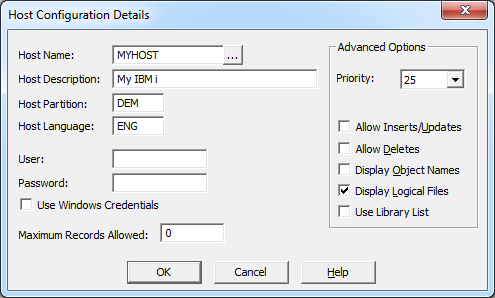
Options must be specified in the Host Configuration Details dialog box for each host from which LANSA Client is to retrieve data.
Host Name
This name is the local control point name of the host, in not more than 8 characters.
...
| Tip |
|---|
Tip: If you want to set up LANSA Client to access more than one partition on the same host, define each of the partitions as a separate host system. |
Host Description
A short description of the host using 40 characters or less. This name must be unique as it is used by the end user to select the host system from which LANSA Client is to retrieve data. The same name is also displayed in the Administrator's Configured Hosts lists.
Host Partition
This is the name of the partition on the host system which you want LANSA Client to access. A partition is like a library or a directory. The partition name cannot be longer than 3 characters.
If you leave this entry blank, you will be connected to the default partition within the host system.
Host Language
If this host or partition is multilingual, then specify the language in which the file's and field's descriptions are to be retrieved.
...
Leave this entry blank if you want to use the default language for the partition or host.
User and Password
Specify a User ID and Password to be used whenever LANSA Client communicates with the host system.
...
| Info |
|---|
Kerberos works without further configuration directly to a server with no access outside that server, say to SQL Server or a file share. If access outside of that 1 server is required – so called "multi-hop" – then this is what is supported:
If your environment does not allow one of these configurations then multi-hop cannot be used. |
Maximum Records Allowed
The maximum number of records to be retrieved from each query. This limit applies to the number of records transferred from the host to the workstation, not to the number of records read.
...