Page History
The list of features that you have on your selected LANSA configuration is displayed in the Installation/Upgrade - Features dialog:
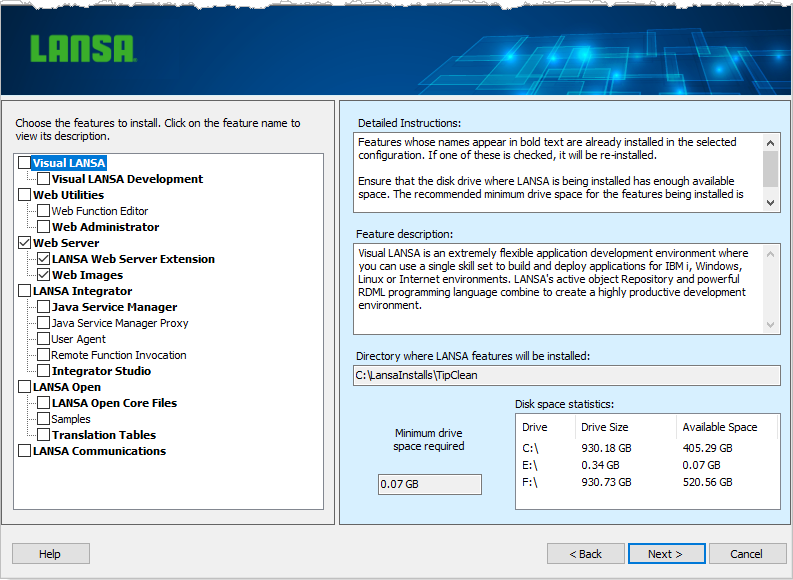
1. Select the features you wish to repair or modify. Features whose names appear in bold text are already installed in the selected configuration. If one of these is checked, it will be re-installed. Recommended
Recommended minimum drive space and Disk space statistics
Note the size increase required for the features selected and the available space on your workstation.
2. If you wish to continue, press the Next> Next> button.
3. Options Options and Summary
The options related to the features that you selected will be displayed with a question mark against those items for which you either need to supply information or confirm details.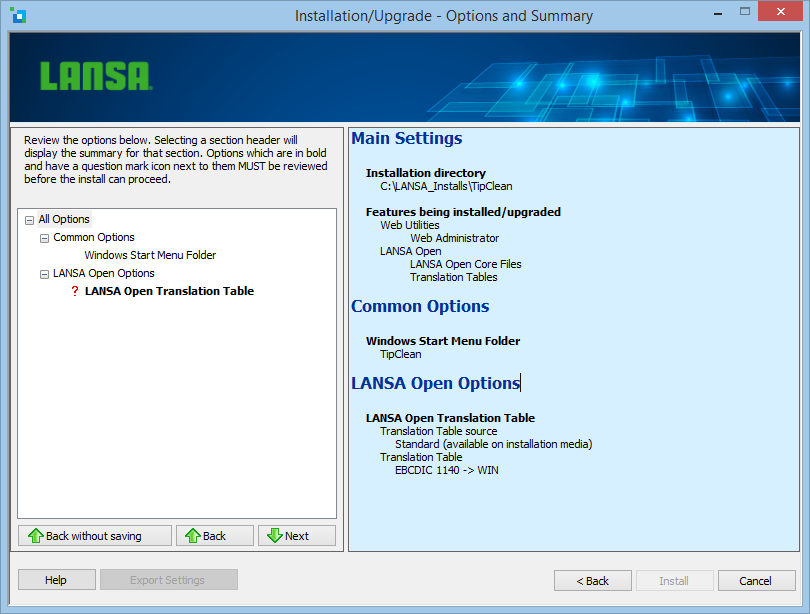
Once you have reviewed each item with a question mark, it will be converted to a tick.
4. When all question marks have been reviewed, you will be able to continue to the Install or you can revert to the previous screen by pressing the <Back <Back button.
Refer to the Options and Summary topic where you can Specify Options required by the individual features.