Page History
...
The following manager.properties entries control the Console address and port:
   console.tcp.port=4561
   console.tcp.backlog=5
   console.tcp.interface=*all
...
If no Console or Studio access is required, then disable access using the following property and value:
console.tcp.interface=*none
...
To control which clients can connect to the Console server use the following entries:
   console.client.address=*all
   studio.client.address=*all
...
To access the Console from a web browser, use the http://host:port URL.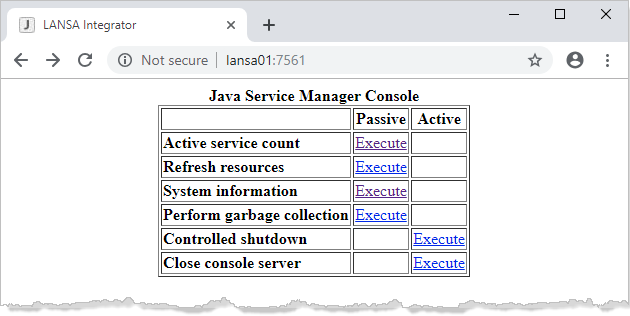
The Active service count command returns the number of service threads currently running.
...
The console-log.txt entry is made up of a date time stamp, IP address of the client program and the request. This provides an audit log of all requests made using the Java Service Manager Console.
Example
   [2019-02-03 01:57:56 +0000] =======================================================
   [2019-02-03 01:58:50 +0000] [10.2.1.55] Request for download [/jsm/instance/order.txt; ]
   [2019-02-03 01:58:55 +0000] [10.2.1.55] Request for thread count
   [2019-02-03 01:59:01 +0000] [10.2.1.55] Request for refresh
The console.timezone property can be used to adjust GMT to local time, if the Java 'user.timezone' has been set differently. For example:
   # A custom time zone like GMT+10:00 does not include daylight savings time
   # console.timezone=GMT+10:00
   # console.timezone=Australia/Sydney
   console.timezone=AET
Console Authentication
The console.authentication property controls basic authentication with the client web browser. If the console.authentication property has a value of *yes then client authentication is done:
...
If console authentication is turned on then client web browsers will prompt with an authentication dialog box. By default, no Access Control File exists. You need to login using the user name of admin and password of admin.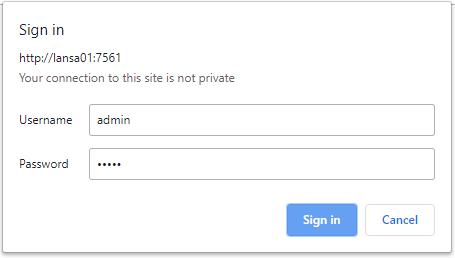
The Access Control File .axespwd in the system subfolder will be created with the admin user as an entry. Use Studio to Add, Change and Remove users from this Access Control File.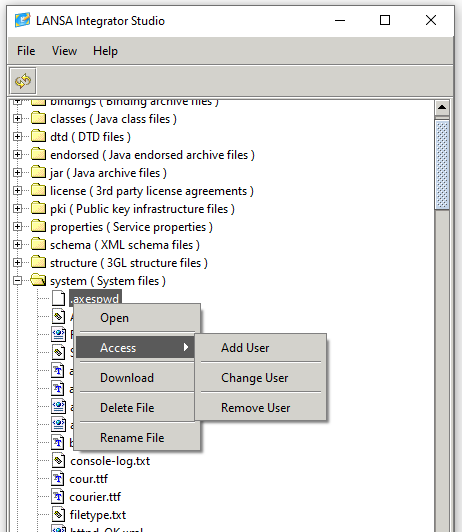
If the user is authenticated, then the log events include the user name:
[2019-04-01 03:02:47 +0000] [10.2.1.55] [admin] GET /REQUEST-SYSTEM-REFRESH
The console.client.address can be used to control what web browser client addresses can connect. If more than one client address is needed then comma separate the multiple addresses:
   console.client.address=*all
   # console.client.address=*none
   # console.client.address=10.2.1.7
   # console.client.address=10.2.1.7,10.2.1.8
...
The studio.authentication property controls authentication with the client Studio application. If the studio.authentication property has a value of *yes then client authentication is done.
studio.authentication=*yes
If studio authentication is turned on, then client Studio applications will prompt with an authentication dialog box. By default, no Access Control File exists. You need to login using the user name of admin and password of admin.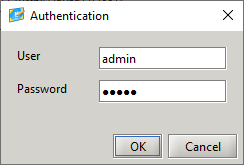
The Access Control File .axespwd in the system subfolder will be created with the admin user as an entry. Use Studio to Add, Change and Remove users from this Access Control File.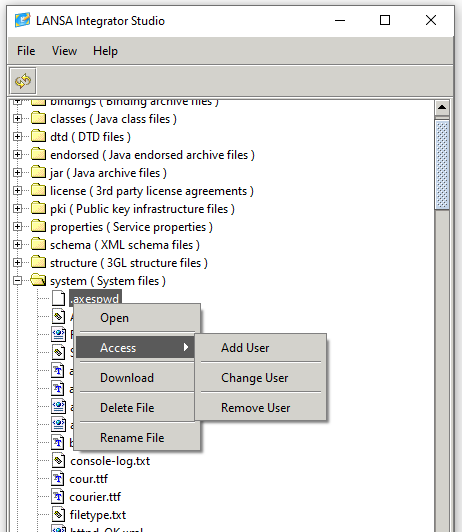
If the user is authenticated, then the log events include the user name
[2019-04-01 03:03:23 +0000] [10.2.1.55] [admin] Request for download [/devjsm/instance/order.xml;]
The studio.client.address can be used to control what studio client address can connect, if more than one client address is needed then comma separate the multiple addresses.
   studio.client.address=*all
   # studio.client.address=*none
   # studio.client.address=10.2.1.7
   # studio.client.address=10.2.1.7,10.2.1.8
The studio.include.trace.directory can be used to control the depth of the trace directory being sent to the Studio client. By default, all child directories in the trace directory are sent.
# studio.include.trace.directory=*all | *active | *none | *client...