Page History
Following is an example to explain the concept of ActiveX Error trapping. Copy and paste the code into a RDMLX enabled form, compile and run it.
To gain an understanding of the concept, follow the comments within the supplied code.
How to set it up:1. Set
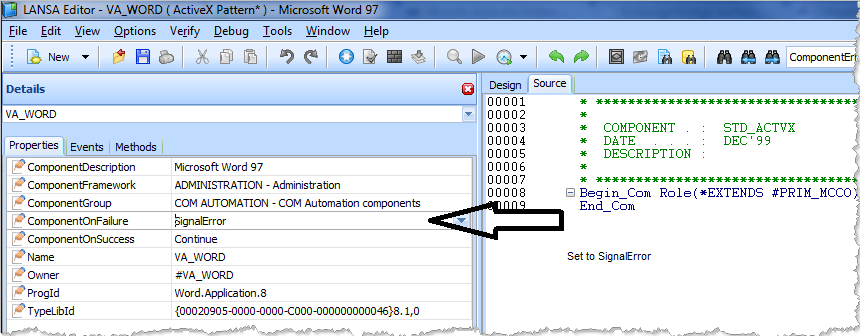
- Set the ActiveX ComponentOnFailure Property.
...
- Trap error in code.
...
- Set the ActiveX ComponentOnFailure property to "SignalError".
...
*Trap error in codeFunction Options(*DIRECT)Begin_Com Role(*EXTENDS #PRIM_FORM) Clientheight(376) Clientwidth(208) Height(414) Left(295) Top(178) Width(224) Define_Com Class(#PRIM_PHBN) Name(#StartWord) Caption('Start Word') Displayposition(1) Left(8) Parent(#COM_OWNER) Tabposition(1) Top(8) Width(193) Define_Com Class(#PRIM_PHBN) Name(#CreateDocument) Caption('Create Document') Displayposition(2) Left(8) Parent(#COM_OWNER) Tabposition(2) Top(40) Width(193) Define_Com Class(#PRIM_PHBN) Name(#FindBookmark) Caption('Access Bookmark') Displayposition(3) Left(8) Parent(#COM_OWNER) Tabposition(3) Top(72) Width(193) Define_Com Class(#va_word.Application) Name(#Word) Reference(*dynamic)Define_Com Class(#va_word.Document) Name(#ActiveDocument) Reference(*dynamic)Define_Com Class(#va_word.Bookmarks) Name(#Bookmarks) Reference(*dynamic) Evtroutine Handling(#StartWord.Click)
...
* Start an instance of wordSet_Ref Com(#Word) To(*Create_as #va_word) Endroutine Evtroutine Handling(#CreateDocument.Click) If (#Word *IsNot *null) If (#ActiveDocument *Is *null)
...
* Open a new document#ActiveDocument <= #Word.Documents.Add
...
* Get the reference to the Bookmarks of the Active Document
* This is necessary to be able to listen to the activeX errors
#Bookmarks <= #ActiveDocument.Bookmarks Else Use Builtin(ov_message_box) With_Args("Document Aleady Exists") Endif Else Use Builtin(ov_message_box) With_Args("Word Has Not Yet been Started") Endif Endroutine Evtroutine Handling(#FindBookmark.Click) Define_Com Class(#va_word.Bookmark) Name(#Bookmark) Reference(*dynamic)
...
* Ensure there is an Active DocumentIf (#ActiveDocument *IsNot *null)
...
* Try to access a bookmark
* As this is a new document there will be no bookmarks
* This will generate an ActiveX error on Bookmarks ONLY #Bookmark <= #Bookmarks<1> Else Use Builtin(Ov_message_box) With_Args("There Is No Active Document") Endif Endroutine Evtroutine Handling(#Word.ComponentError)
...
* This routine will never fire. The bookmark error is specific to the Bookmark instance Use Builtin(Message_Box_Add) With_Args("Error on Word")Use Builtin(Message_Box_Add) With_Args(#Com_err_info.ErrorWord) Use Builtin(Message_Box_Show) Endroutine Evtroutine Handling(#Bookmarks.ComponentError) Use Builtin(Message_Box_Add) With_Args("Error on Bookmarks")Use Builtin(Message_Box_Add) With_Args(#Com_err_info.ErrorWord) Use Builtin(Message_Box_Show) Endroutine Evtroutine Handling(#Com_Owner.Closing)
...
* Drop all references and ensure Word quits correctly#Word.Documents.Close If (#Word *IsNot *null) #Word.Quit Endif Endroutine End_Com
...
Background notes
To handle runtime errors in LANSA, you need to understand the difference between LANSA generated errors and errors generated by ActiveX controls.
Consider the following code sample:
Function Options(*DIRECT)Begin_Com Role(*EXTENDS #PRIM_FORM) Clientheight(313) Clientwidth(492)Define_Com Class(#PRIM_STBR) Name(#STBR_1) Displayposition(1) Height(24) Left(0) Messageposition(1) Parent(#COM_OWNER) Tabposition(1) Tabstop(False) Top(278) Width(484)Define_Com Class(#VA_WORD.Application) Name(#VA_WORD)Evtroutine Handling(#com_owner.Initialize)Message Msgtxt("Throwing ActiveX error")#VA_WORD.ComponentOnFailure := SignalErrorIf (#VA_WORD.ActiveDocument.Bookmarks.Exists( " ERROR" ))EndifEndroutineEvtroutine Handling(#VA_WORD.ComponentError) Options(*NOCLEARMESSAGES *NOCLEARERRORS)Message Msgtxt(("Catching ActiveX error").BlankConcat( #COM_ERR_INFO.ErrorCode.AsString ))#COM_ERR_INFO.ClearEndroutineEnd_Com
In the above example, the initialize event references Word.ActiveDocument.Bookmarks. However, if there is no ActiveDocument, that is, you have neither explicitly created nor opened a document, the ActiveDocument reference in Word will be null. This means that the moment the Visual LANSA runtime attempts to access the ActiveDocument property of Word, there will be a LANSA generated runtime error reporting that Word.ActiveDocument is Null.
Had the initialize event been as follows, no such error would occur.
* Add a new (active) document.#VA_Word.AddIf (#VA_word.ActiveDocument.Bookmarks.Exists("Etc")etc.
It is therefore the responsibility of the developer to ensure that before trying to access a feature that references another instance, that suitably defensive code is included.
If (#Word.ActiveDocument *isnot *null)If (#VA_word.ActiveDocument.Bookmarks.Exists("Error")etc.elseUse OV_message_box ("There is no Active Document")Endif
Even though this code now avoids the LANSA generated runtime error, you still can't detect an ActiveX error by listening to VA_WORD because the ActiveX error for a missing bookmark belongs to the Bookmarks feature. Therefore, you need to set up specific references in the code.
Define_Com Class(#va_word.Application) Name(#Word) Reference(*dynamic)Define_Com Class(#va_word.Document) Name(#ActiveDocument) Reference(*dynamic)Define_Com Class(#va_word.Bookmarks) Name(#Bookmarks) Reference(*dynamic)Evtroutine #Com_owner.CreateInstance* Start WordSet_Ref Com(#Word) To(*Create_as #va_word)* Create a new document and store the reference#ActiveDocument <= #Word.Documents.Add#Bookmarks <= #ActiveDocument.Bookmarks Endroutine
When you now attempt to access a bookmark that doesn't exist, the error generated by Word can be detected as follows:
Evtroutine Handling(#Bookmarks.ComponentError)Use Builtin(Message_Box_Add) With_Args("Error on Bookmarks")Use Builtin(Message_Box_Add) With_Args(#Com_err_info.ErrorWord)Use Builtin(Message_Box_Show)Endroutine