Page History
When you select the Routing option, you have the following routes available:
Child Routes
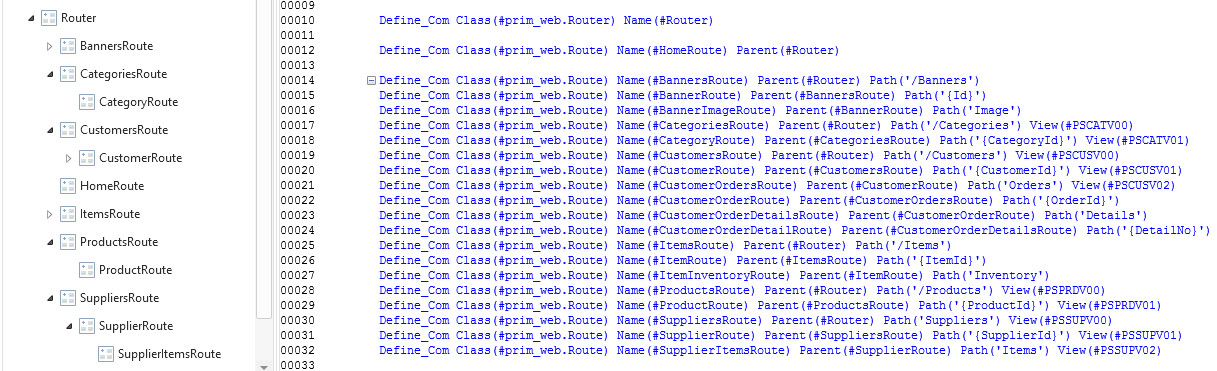
A child route is instantiated by adding the Parent(#ExampleRoute) to the #PRIM_WEB.Route class. The purpose of a child route is to build a path hierarchy. For example, a #CustomersRoute may have child routes #CustomerContact, #CustomerMap, and #Customer Profile.
Nested Routes
Nested routes are routes that are attached to their own View Container and Router. Within a nested route, a developer is able to have a distinct tree of routes that are associated with additional views within its own view container.
The following snippet from the view (PSCATV01) associated with the component name #CategoryRoute in the previous image has its own router that allows the nesting of additional views inside its own view container. Thus, an active path like /Categories/Fluffy/Products/P123 uses the path segment /Categories/Fluffy to identify PSCATV01 and when PSCATV01 is created, the route component named ProductItemRoute is identified using the Products/P123.

Protected Routes
Protected routes are used by Web Applications to trigger special handling that includes authentication and authorization.
Wildcards
Wildcards are used in paths. The path string of a route can end with the asterisk character and trigger a match with this route. No exact or partial matches can be found.
| Note |
|---|
| Note: Routing handles partial matches. |