Page History
This example will navigate to the Browse and Maintain Employees screen which is part of the Personnel System.
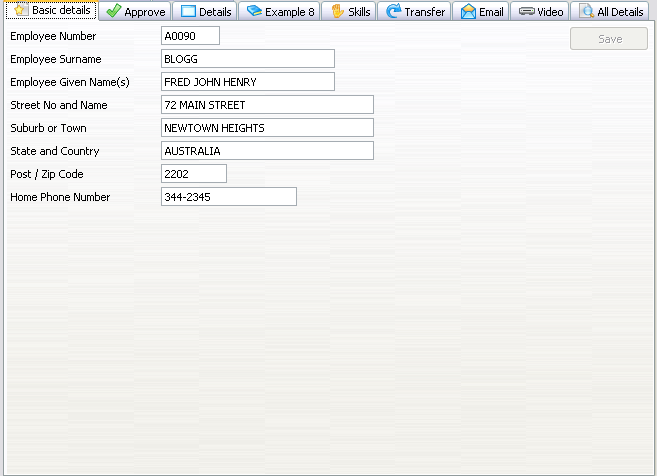
To reach this screen, RAMP scripts will execute the following steps:
- Sign on
- Type lansa run pslsys partition(dem) in the command line and press Enter.
- Type 3 in the option field and press Enter.
- Type the employee number of the currently selected employee and press Enter.
- Press F21.
...
     Function Options(*DIRECT)

     Begin_Com Role(*EXTENDS #VF_AC010) Height(569) Layoutmanager(#MAIN_LAYOUT) Width(776)
...
     * ================================================================================
     * Simple Field and Group Definitions
     * ================================================================================

     Group_By Name(#XG_HEAD) Fields(#EMPNO #SURNAME #GIVENAME #ADDRESS1 #ADDRESS2 #ADDRESS3 #POSTCODE #PHONEHME #DEPTMENT #SECTION)
...
...
     * Body and Button arrangement panels

     Define_Com Class(#PRIM_PANL) Name(#BUTTON_PANEL) Displayposition(2) Height(569) Hint(*MTXTDF_DET1) Layoutmanager(#BUTTON_FLOW) Left(688) Parent(#COM_OWNER) Tabposition(3) Tabstop(False) Top(0) Width(88)

     Define_Com Class(#PRIM_PANL) Name(#BODY_HEAD) Displayposition(1) Height(569) Hint(*MTXTDF_DET1) Layoutmanager(#BODY_HEAD_FLOW) Left(0) Parent(#COM_OWNER) Tabposition(2) Tabstop(False) Top(0) Verticalscroll(True) Width(688)
...
     * Attachment and flow layout managers

     Define_Com Class(#PRIM_ATLM) Name(#MAIN_LAYOUT)

     Define_Com Class(#PRIM_FWLM) Name(#BUTTON_FLOW) Direction(TopToBottom) Flowoperation(Center) Marginbottom(4) Marginleft(4) Marginright(4) Margintop(4) Spacing(4) Spacingitems(4)
     Define_Com Class(#PRIM_FWLM) Name(#BODY_HEAD_FLOW) Direction(TopToBottom) Marginbottom(4) Marginleft(4) Marginright(4) Margintop(4) Spacing(4) Spacingitems(4)

     Define_Com Class(#PRIM_FWLI) Name(#FWLI_EMPNO) Manage(#EMPNO) Parent(#BODY_HEAD_FLOW)
     Define_Com Class(#PRIM_FWLI) Name(#FWLI_SURNAME) Manage(#SURNAME) Parent(#BODY_HEAD_FLOW)
     Define_Com Class(#PRIM_FWLI) Name(#FWLI_GIVENAME) Manage(#GIVENAME) Parent(#BODY_HEAD_FLOW)
     Define_Com Class(#PRIM_FWLI) Name(#FWLI_ADDRESS1) Manage(#ADDRESS1) Parent(#BODY_HEAD_FLOW)
     Define_Com Class(#PRIM_FWLI) Name(#FWLI_ADDRESS2) Manage(#ADDRESS2) Parent(#BODY_HEAD_FLOW)
     Define_Com Class(#PRIM_FWLI) Name(#FWLI_ADDRESS3) Manage(#ADDRESS3) Parent(#BODY_HEAD_FLOW)
     Define_Com Class(#PRIM_FWLI) Name(#FWLI_POSTCODE) Manage(#POSTCODE) Parent(#BODY_HEAD_FLOW)
     Define_Com Class(#PRIM_FWLI) Name(#FWLI_PHONEHME) Manage(#PHONEHME) Parent(#BODY_HEAD_FLOW)
     Define_Com Class(#PRIM_FWLI) Name(#FWLI_SAVE_BUTTON) Manage(#SAVE_BUTTON) Parent(#BUTTON_FLOW)
...
...
     * The save button
     Define_Com Class(#PRIM_PHBN) Name(#SAVE_BUTTON) Caption(*MTXTDF_SAVE) Displayposition(1) Left(4) Parent(#BUTTON_PANEL) Tabposition(1) Top(4)
...
...
     * Collection for detail fields
     Define_Com Class(#Prim_ACol<#prim_evef>) Name(#PanelFields)
...
...
     * Fields in the head area

     Define_Com Class(#EMPNO.Visual) Displayposition(1) Height(19) Hint(*MTXTDF_DET1) Left(4) Parent(#BODY_HEAD) Readonly(True) Tabposition(1) Top(4) Usepicklist(False) Width(209)
     Define_Com Class(#SURNAME.Visual) Displayposition(2) Height(19) Hint(*MTXTDF_DET1) Left(4) Parent(#BODY_HEAD) Tabposition(2) Top(27) Usepicklist(False) Width(324)
     Define_Com Class(#GIVENAME.Visual) Displayposition(3) Height(19) Hint(*MTXTDF_DET1) Left(4) Parent(#BODY_HEAD) Tabposition(3) Top(50) Usepicklist(False) Width(324)
     Define_Com Class(#ADDRESS1.Visual) Displayposition(4) Height(19) Hint(*MTXTDF_DET1) Left(4) Parent(#BODY_HEAD) Tabposition(4) Top(73) Usepicklist(False) Width(363)
     Define_Com Class(#ADDRESS2.Visual) Displayposition(5) Height(19) Hint(*MTXTDF_DET1) Left(4) Parent(#BODY_HEAD) Tabposition(5) Top(96) Usepicklist(False) Width(363)
     Define_Com Class(#ADDRESS3.Visual) Displayposition(6) Height(19) Hint(*MTXTDF_DET1) Left(4) Parent(#BODY_HEAD) Tabposition(6) Top(119) Usepicklist(False) Width(363)
     Define_Com Class(#POSTCODE.Visual) Displayposition(7) Height(19) Hint(*MTXTDF_DET1) Left(4) Parent(#BODY_HEAD) Tabposition(7) Top(142) Usepicklist(False) Width(216)
     Define_Com Class(#PHONEHME.Visual) Displayposition(8) Height(19) Hint(*MTXTDF_DET1) Left(4) Parent(#BODY_HEAD) Tabposition(8) Top(165) Usepicklist(False) Width(286)

     Define_Com Class(#PRIM_ATLM) Name(#ATLM_1)
     Define_Com Class(#PRIM_ATLI) Name(#ATLI_1) Attachment(Center) Parent(#ATLM_1)
     Define_Com Class(#PRIM_ATLI) Name(#ATLI_2) Attachment(Center) Manage(#BODY_HEAD) Parent(#MAIN_LAYOUT)
     Define_Com Class(#PRIM_ATLI) Name(#ATLI_3) Attachment(Right) Manage(#BUTTON_PANEL) Parent(#MAIN_LAYOUT)

     Define_Com Class(#vf_sy122) Name(#myscreen_wrapper) Displayposition(3) Height(569) Parent(#COM_OWNER) Width(688)

     Define_Com Class(#PRIM_ATLI) Name(#ATLI_4) Attachment(Center) Parent(#MAIN_LAYOUT)
     Define_Com Class(#PRIM_ATLI) Name(#ATLI_6) Attachment(Center) Manage(#myscreen_wrapper) Parent(#MAIN_LAYOUT)
...
     * =================================================================================================
     * To better understand this example you should be famililar with the shipped Personnel System demo.
     *
     * We expect the following screens to appear as part of this navigation:
     *
     * Login -> type in user and password -> press Enter -> (a special screen? <F3>)
     * i5 Main Menu -> type lansa run process(pslsys) partition(dem) -> press Enter
     * Personnel System  -> type option 3 -> press Enter
     * Inquire -> type the current instance employee number -> press Enter
     * Browse Employee Details and Skills in OUTPUT mode -> press F21
     * Browse Employee Details and Skills in INPUT mode
     * =================================================================================================
     *
     * --------------------------------------------------------------------------------
     * Handle Initialization
     * --------------------------------------------------------------------------------

     Mthroutine Name(uInitialize) Options(*REDEFINE)

     Define_Com Class(#Prim_evef) Name(#FormField) Reference(*dynamic)

     Invoke Method(#Com_Ancestor.uInitialize)

     For Each(#Control) In(#Body_Head.ComponentControls)

     If_Ref Com(#Control) Is(*INSTANCE_OF #prim_evef)

     Set_Ref Com(#FormField) To(*dynamic #Control)

     Invoke Method(#PanelFields.Insert) Item(#FormField)

     Endif

     Endfor
...
...
     * Set the uCommand wrapper property.
     Set Com(#myscreen_wrapper) Ucommand(#com_owner)

     Endroutine
...
     * ----------------------------------------------------------------------------------------------------
     * Handle Command Execution
     *
     * Always invoke makerampTSavailable to ensure RAMP-TS is up and running before starting a navigation
     *
     * You may also disable the entire form to prevent any input while RAMP is navigating
     * ----------------------------------------------------------------------------------------------------
...
     Mthroutine Name(uExecute) Options(*REDEFINE)

     Invoke Method(#Com_Ancestor.uExecute)

     #myscreen_wrapper.makerampTSavailable

     Set Com(#Save_Button) Enabled(False)

     #com_owner.enabled := false
     Endroutine
...
     * ================================================================================
     * Event Handlers
     * ================================================================================
...
...
     * RAMP has signalled it's ready. Invoke your navigation here.
     *
     * Once the navigaton starts, processing resumes in the vHandleArrive event handler.
     *
     Evtroutine Handling(#myscreen_wrapper.RampTSAvailable)

     Invoke Method(#myscreen_wrapper.navigatetoscreen) Name('updempskills')

     Endroutine

     *
     * The Payload is a 256 character string sent together with a SENDKEY. Use the Payload in the same way you would use parameters in an event.
     * Assuming when 'updempskills' arrives we change some details and press Enter or click on the SAVE button, we expect one of these 2 screens to appear:
     * If the SAVE was successfull, the INQUIRE screen appears.
     * If the SAVE was NOT successfull, the update employee screen will reappear
     * Setting the Payload we determine what caused the screen 'updempskills' to arrive.
     *
     * 1. In the Button script of updempskills for the Enter key, we attach a payload = "UPDATE_EMPLOYEE":
     *
     *    case KeyEnter:
     *        SENDKEY( KeyEnter, "UPDATE_EMPLOYEE" );
     *        break;
     * 2. In the ARRIVE script of INQUIRE, we test payload. If the Payload is UPDATE_EMPLOYEE this is telling us we have just done an Update and we are most likely to want to go back to the same screen.
     *
     *    if ( TOSTRING(oPayload) == "UPDATE_EMPLOYEE")
     *    {
     *       NAVIGATE_TO_DESTINATION("updempskills");
     *    }
     *
     Evtroutine Handling(#myscreen_wrapper.vHandleArrive) Arrivedscreen(#CurrentScreen) Previousscreen(#PreviousScreen) Arrivedpayload(#Payload)
...
     Case (#CurrentScreen)

     When Value_Is(= 'updempskills')

     Set Com(#SAVE_BUTTON) Enabled(false)
...
     * Payloads are destroyed when the ARRIVE script finishes executing. Therefore, a payload of UPDATE_EMPLOYEE would most likely mean there was a validation error. Otherwise - if INQUIRE had arrived - the Payload would have been destroyed.
     If (#Payload = UPDATE_EMPLOYEE)

     Use Builtin(message_box_show) With_Args(ok ok info "Validation Error" "Please correct any errors")

     Else
...
...
     * Unlock the framework
     Set Com(#avFrameworkManager) Ulocked(false)

     #myscreen_wrapper.getvalue From('empno') Value(#empno.value)
     #myscreen_wrapper.getvalue From('surname') Value(#surname.value)
     #myscreen_wrapper.getvalue From('givename') Value(#givename.value)
     #myscreen_wrapper.getvalue From('address1') Value(#address1.value)
     #myscreen_wrapper.getvalue From('address2') Value(#address2.value)
     #myscreen_wrapper.getvalue From('address3') Value(#address3.value
...
)
     #myscreen_wrapper.getvalue From('homephone') Value(#phonehme.value)
     #myscreen_wrapper.getvalue From('postcode') Value(#POSTCODE.value)

     #com_owner.enabled := true

     Endif

     Endcase

     Endroutine
...
     * --------------------------------------------------------------------------------
     * Handle Save
     * --------------------------------------------------------------------------------

     Mthroutine Name(Save)
...
     * Set the 5250 field values to the values from this panel
     #myscreen_wrapper.setvalue Infield('surname') Value(#surname.value)
     #myscreen_wrapper.setvalue Infield('givename') Value(#givename.value)
     #myscreen_wrapper.setvalue Infield('address1') Value(#address1.value)
     #myscreen_wrapper.setvalue Infield('address2') Value(#address2.value)
     #myscreen_wrapper.setvalue Infield('address3') Value(#address3.value)
     #myscreen_wrapper.setvalue Infield('homephone') Value(#phonehme.value)
     #myscreen_wrapper.setvalue Infield('postcode') Value(#POSTCODE.value)
...
...
     * Send the Enter key with the payload
     #myscreen_wrapper.sendkey Key(#myscreen_wrapper.KeyEnter) Payload(UPDATE_EMPLOYEE)

     Endroutine
...
     * Listen to messages from RAMP and the 5250 application

     Evtroutine Handling(#myscreen_wrapper.RampMessage) Umessagetype(#MsgType) Umessagetext(#MsgText)

     Case (#msgtype.value)

     When Value_Is('= VF_ERROR')
...
     * Fatal messages reported by Ramp (e.g. Navigation request failed, etc). If in design mode, show the underlying 5250 screen. Otherwise, make the error message appear in a message box on top of the command

     If (#usystem.iDesignMode = true)

     Set Com(#myscreen_wrapper) Visible(True)

     Else

     Message Msgid(dcm9899) Msgf(dc@m01) Msgdta(#msgtext.value)

     #com_owner.avshowmessages
...
     Endif

     * Messages sent by the IBM i application or unknown form was encountered

     When Value_Is('= VF_INFO' '= VF_UNKNOWN_FORM')

     Message Msgid(dcm9899) Msgf(dc@m01) Msgdta(#msgtext.value)
...
...
     * Failure to initialize RAMP. Could occur for mainly one of two reasons

     When Value_Is('= VF_INIT_ERROR')

     Message Msgid(dcm9899) Msgf(dc@m01) Msgdta(#msgtext.value)

     #com_owner.avshowmessages

     Otherwise

     Use Builtin(message_box_show) With_Args(ok ok info *Component ('Unknown message type ' + #MsgType + 'encountered'))
...
     Endcase

     Endroutine
...
     * --------------------------------------------------------------------------------
     * Handle changes in any of the fields on the panel
     * --------------------------------------------------------------------------------

     Evtroutine Handling(#PanelFields<>.Changed)
...
     * Enable the save button
     Set Com(#SAVE_BUTTON) Enabled(True)
...
     * Lock the framework and set a message for the user
     Use Builtin(bconcat) With_Args('Changes made to employee' #GiveName #Surname 'have not been saved yet.' 'Do you want to save them before continuing?') To_Get(#sysvar$av)

     Set Com(#avFrameworkManager) Ulocked(USER) Ulockedmessage(#sysvar$av)

     Endroutine
...
     * --------------------------------------------------------------------------------
     * Enter key pressed
     * --------------------------------------------------------------------------------
...
     Evtroutine Handling(#PanelFields<>.KeyPress) Options(*NOCLEARMESSAGES *NOCLEARERRORS) Keycode(#KeyCode)

     If Cond('#KeyCode.Value = Enter')
...
...
     * If there no changes have been made issue message and ignore enter

     If Cond('#SAVE_BUTTON.Enabled *EQ True')

     Invoke Method(#Com_Owner.Save)

     Else
...
     * Issue 'There are no changes to save' message

     Use Builtin(Message_box_show) With_Args(ok ok Info *Component *MTXTDF_NO_SAVE)

     Endif

     Endif

     Endroutine
...
     * --------------------------------------------------------------------------------
     * Handle the save button
     * --------------------------------------------------------------------------------

     Evtroutine Handling(#SAVE_BUTTON.Click)

     #com_owner.Save

     Endroutine
...
* --------------------------------------------------------------------------------
...
     * Handle Termination
     *
...
--------------------------------------------------------------------------------

     Mthroutine Name(uTerminate) Options(*REDEFINE)
...
     * Clean up the colelction of fields on the panel
     Invoke Method(#PanelFields.RemoveAll)
...
...
     * Do any termination defined in the ancestor
     Invoke Method(#Com_Ancestor.uTerminate)

     Endroutine

     End_Com
...