Page History
...
When
...
you
...
automatically
...
generate
...
scripts
...
using
...
tracking
...
information,
...
the
...
scripts
...
will
...
contain
...
the
...
hardcoded
...
field
...
values
...
you
...
typed.
...
To
...
make
...
the
...
script
...
to
...
work
...
with
...
any
...
selected
...
object,
...
you
...
need
...
to
...
replace
...
the
...
hardcoded
...
value
...
with
...
the
...
appropriate
...
identifier.
...
To
...
replace
...
the
...
hardcoded
...
employee
...
number
...
"A1234"
...
in
...
this
...
line
...
of
...
script
...
with
...
the
...
name
...
of
...
the
...
employee
...
currently
...
selected
...
in
...
the
...
instance
...
list:
...
SETVALUE("uEmpNo","A1234");
...
First
...
find
...
out
...
the Visual and Programmatic Identifiers used to identify the employee. Then highlight the hardcoded number "A1234" (including the quotes) in the script, right-click to bring up the pop-up menu, select the Current Instance List Entry option and select the appropriate identifier: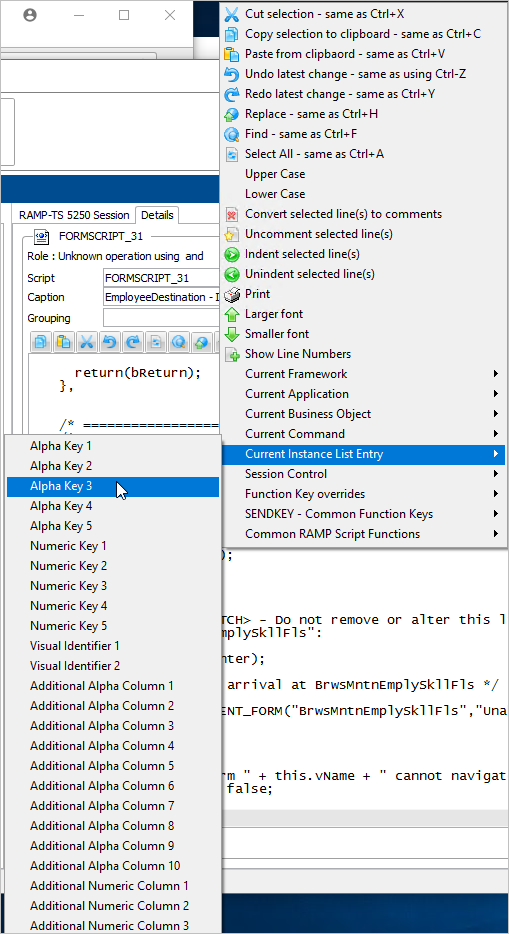
The constant "A1234" is now replaced with the programmatic identifier of the employee number:
SETVALUE("uEmpNo", objListManager.AKey3
...
[0...
])...
;...