Page History
In this step you learn how to use the fields on the screen as an additional identifier.
Press F3 twice to go back to the Main menu.
Resize the panels for a larger view of the Fields list. Fields is the visualization of the fields defined on the screen as a list, ordered by row and column.
The first column for fields is a checkbox. When checked, the value of the field at that time in that row and column – also highlighted on the screen –becomes the secondary key.
As you hover over the fields in list, the corresponding field is highlighted on the screen.
For example:
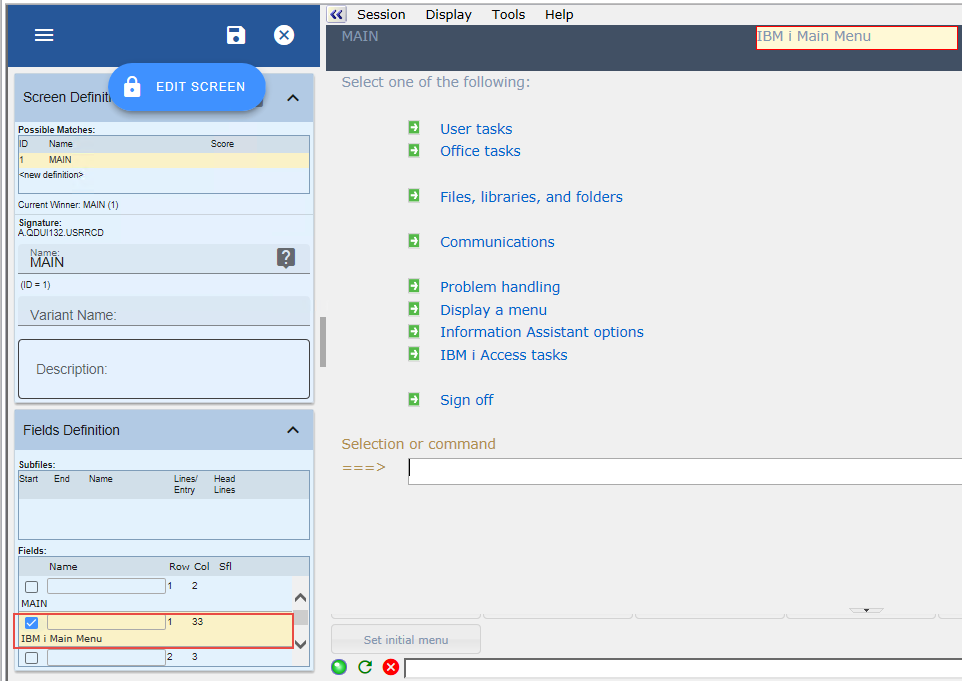
You can choose any field if each time the screen is displayed, the field(s) appear in the same row/column with the same value and its value is unique amongst screens with the same record format.