Page History
LCE250 - Field Conditions
1. Close the Results windows.
2. From the toolbar select the Options menu and then choose the Field Conditions… command. Alternatively, you could select the 
 Set field conditions icon from the toolbar.
3. The selected records also need to match the following conditions:
- The Annual Salary value must be less than 20,000 OR greater than 100,000.
- Make the condition that the Annual Salary values will be prompted for at run time.
- Use prompt text "Low salary exceptions" and "High salary exceptions".

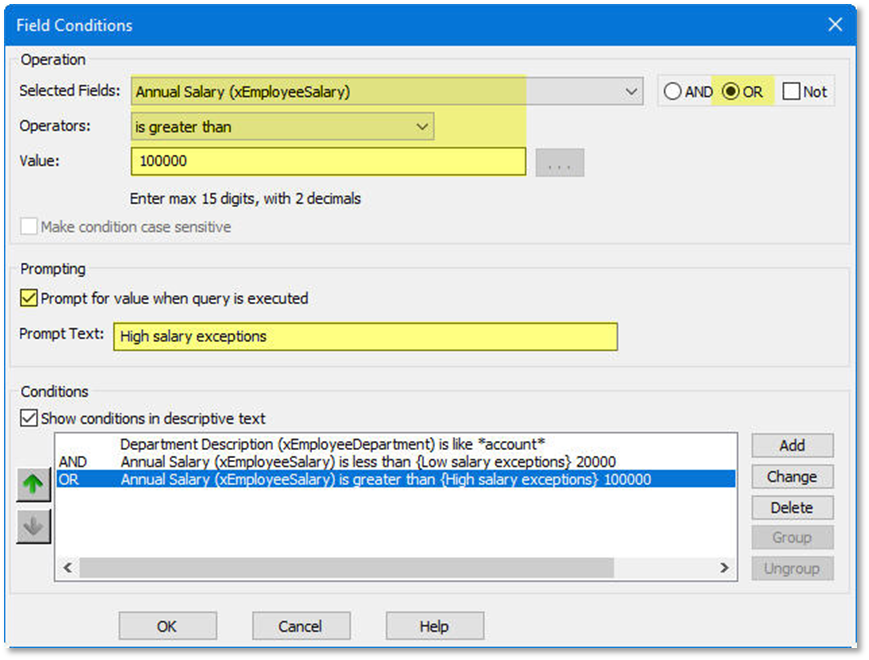
4. Make sure to click the Add button to commit any new field conditions, or click the Change button to commit any updates to existing field conditions.
5. Consider carefully which conditions to group.
Select the conditions to be grouped, then click the Group button.
6. Click the OK button when finished working with Field Conditions.