Page History
...
2. There are no additional properties on weblets to navigate to Webevent (such as there is for Webroutines). HandleWebEvent() can be called from the presubmit_js property of most weblets, or via user defined JavaScript. It is possible, for example, to directly set JavaScript to execute by setting the onclick attribute value: document
document.LANSA.SEARCH.onclick = "HandleWebEvent('MYPROC', 'MYFUNC', null, 'WEFrame', 'ASURNAME', 'ASTDRENTRY')"
3. The parameters are HandleWebEvent(Process, Webevent, Form, Target, "ASURNAME", "ASTDRENTRY", ...), a variable number of parameters on the end can be passed for fields, the values of which are to be passed to the WebEvent. The parameters are all characters strings except for Form, which should be the actual form DHTML object (e.g. document.MYFORM). It is important to provide a single character prefix before the field name. The prefix is A for Alphanumeric, P for Packed and S for Signed fields, or Q for RDMLX fields. This prefix is required so that a WEBEVENT being invoked is able to exchange the passed field values.
The The Target parameter for the JavaScript function must be specified and must be a name of the contained Navigation panel (std_nav_panel) weblet, window, or your own <iframe> or <frame> HTML element.
...
5. As a result, a WebEvent LANSA function is executed passing the specified field values and a WebEvent page is shown in the Target Navigation panel (std_nav_panel), window, or your own <iframe> or <frame> HTML element.
Example
How a WAM form can initiate a WEBEVENT form and pass information to it.
Consider a Search WAM form, which submits to a Browse WEBEVENT, but passing the entered SURNAME field value, and shows the result in Navigation panel (std_nav_panel) below the Search button.
...
2. Click on the Search button and enter 'HandleWebEvent("MYPROC", "MYFUNC", null, "WEFrame", "ASURNAME", "ASTDRENTRY"); return false;' for the presubmit_js property of the Search button.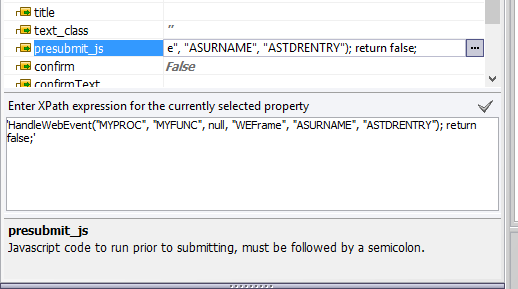
3. When you run this page in the browser, clicking on Search button will submit to a WEBEVENT, showing its page in the Navigation panel (std_nav_panel) weblet, on the same page.