Page History
In this step, you will create a simple logic rule to ensure that the value of the iiiSalary field is always greater than 0.
1. Open the iiiSalary field in the Editor.
2. Select the Rules and Triggers tab.
...
3. Click the Add button on the Home ribbon and select the Add Simple Logic Check option.
...
A new simple logic validation rule is displayed.
4. In the Details tab and the Rule Definitions, create the list check rule as follows:
Rule Definitions:
Description | Salary must be greater than 0 |
Sequence | 1 |
When inserting | Always apply rule (ADD) |
When updating | Always apply rule (CHG) |
When deleting | Never apply rule |
Value | #iiiSalary *gt 0 |
Your Details tab should now look like this:
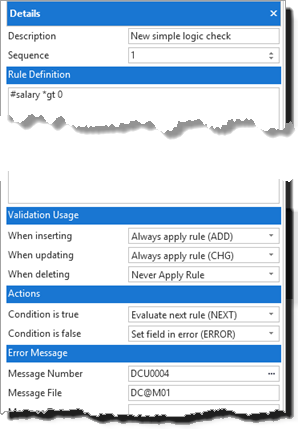
5. Review the Actions settings, ensure the rule is created as follows:
If the condition is found to be true | Evaluate next rule (NEXT) |
If the condition is found to be false | Set field in error (ERROR) |
The Error message file and message number have been created automatically. Note that the error message text for this message is not very helpful:
...
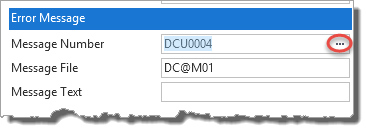
6. To find a more specific error message, click on the ellipsis button in the Message Number:
7. In the Message Files dialog enter "greater" in the Like Description field and click Find. Note that message DEM0011 is appropriate for the rule.
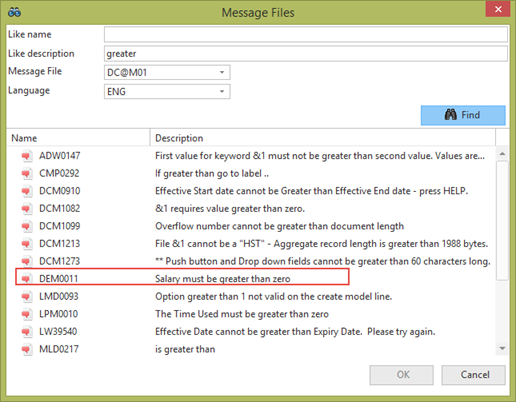
8. Select message number DEM0011 and click OK.
...
Do not add your messages to the shipped LANSA message file, DC@M01.
10. Save Save and close the field.