Page History
...
1. Create the Employee Maintenance form.
a. The template requires the table's Identifier. Look up the Identifier for the table on the Favorites / Last Opened tab. For example, IIIEMPLOYE.
b. Create a form with the following characteristics:
Name | iiiMaintEmployee (where iii=your initials) |
Description | Employee Maintenance |
RDMLX Enabled | Yes |
c. Once the Editor has opened, press the Template button  on the Design ribbon.
d. In the Choose Template dialog, select the VL_BASEMNT - Visual LANSA flat file maintenance template. Press the Execute button.
e. Answer the template questions as shown in the table below. (Remember to replace iii with your 3 character identifier.)
Template/Wizard Question | ANSWER |
|---|---|
Supply a word that describes WHAT this data entry program works with | Employee |
Enter the name of the PHYSICAL file to be used by this template | IIIEMPLOYE |
How do you want to display the fields? | FF |
Fields to appear on display | Select ALL fields. |
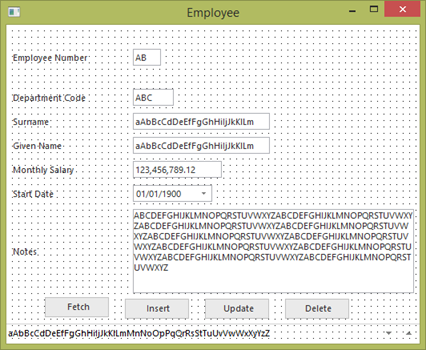
Your Your form is now created and ready for compilation. It is NOT necessary to edit the source.
f. Adjust the width of the fields on the form.
You You may find this quickest, if you select a field and adjust its Width property by guessing a smaller value. Then drag the field making it wider if necessary.
2. Compile the Employee Maintenance form.
a. Click the  button on the Home ribbon to compile your form. The Compile tab will show you the progress of the compile.
...