Page History
...
4. Execute your Department Maintenance form iiiMaintDepartment
a. Try to add a blank department code. Notice the validation messages which appear and their order. Use the up and down buttons in the status bar to see all messages. You will see both field and table level messages.
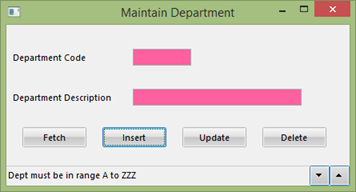
b. Try to add a department code of 111. Notice this also causes a validation error and the fields are highlighted in red.
c. Exit the application.
5. Execute your Employee Maintenance form iiiMaintEmployee.
a. Try to add a new employee with a department code of 111. Notice there is no error because the range check rule was only added to the iiiDeptCode field in table iiiDepartments. The
The rule does not apply to the table iiiEmployees.
b. Close the form.
6. Close the table definition.