Page History
...
The
...
RDMLX
...
Working
...
List
...
weblet
...
provides
...
a
...
flexible
...
mechanism
...
to
...
process
...
working
...
lists.
...
It
...
does
...
not
...
generate
...
any
...
output
...
directly.
...
It
...
repeats
...
whatever
...
content
...
you
...
place
...
in
...
its
...
content
...
area
...
once
...
for
...
each
...
row
...
in
...
the
...
working
...
list.
...
The
...
most
...
common
...
approach
...
to
...
handling
...
repeating
...
content
...
in
...
modern
...
semantic
...
HTML
...
pages
...
is
...
to
...
place
...
it
...
in
...
an
...
HTML
...
list
...
(<ul>
...
or
...
<ol>)
...
and
...
wrap
...
each
...
"row"
...
of
...
repeating
...
content
...
with
...
list
...
item
...
(<li>)
...
tags.
...
This
...
is
...
the
...
approach
...
taken
...
by
...
jQuery
...
Mobile
...
lists.
...
The
...
RDMLX
...
working
...
list
...
weblet
...
allows
...
you
...
to
...
create
...
any
...
repeating
...
content
...
you
...
like
...
such
...
as
...
table
...
rows,
...
divs,
...
etc.
...
To
...
create
...
a
...
jQuery
...
Mobile
...
list,
...
start
...
by
...
dropping
...
an
...
HTML
...
List
...
weblit
...
onto
...
your
...
design.
...
Then
...
drop
...
a
...
RDMLX
...
Working
...
List
...
weblet
...
into
...
the
...
content
...
area
...
of
...
the
...
HTML
...
List.
...
Set
...
the
...
listname
...
property
...
to
...
the
...
name
...
of
...
your
...
working
...
list.
...
Next,
...
drop
...
an
...
HTML
...
List
...
Item
...
weblet
...
into
...
the
...
working
...
list
...
content
...
area.
...
Finally,
...
place
...
the
...
content
...
you
...
want
...
repeated
...
for
...
each
...
row
...
into
...
the
...
list
...
item
...
content
...
area.
...
Referencing
...
column
...
values
...
The
...
data
...
from
...
your
...
webroutine
...
is
...
output
...
as
...
an
...
XML
...
document
...
and
...
passed
...
to
...
the
...
webroutine
...
design
...
for
...
converting
...
into
...
the
...
final
...
HTML
...
output.
...
In
...
order
...
to
...
access
...
the
...
webroutine
...
output,
...
the
...
design
...
needs
...
an
...
XPath
...
expression
...
to
...
tell
...
it
...
where
...
to
...
find
...
the
...
required
...
data
...
in
...
the
...
XML.
...
When
...
you
...
need
...
to
...
access
...
data
...
from
...
a
...
field,
...
you
...
don't
...
normally
...
need
...
to
...
worry
...
about
...
this.
...
You
...
just
...
enter
...
the
...
field
...
name
...
in
...
the
...
property
...
editor
...
(e.g
...
#EMPNO)
...
and
...
the
...
LANSA
...
Editor
...
automatically
...
converts
...
that
...
into
...
the
...
necessary
...
XPath
...
(for
...
example,
...
key('field-value',
...
'EMPNO')).
...
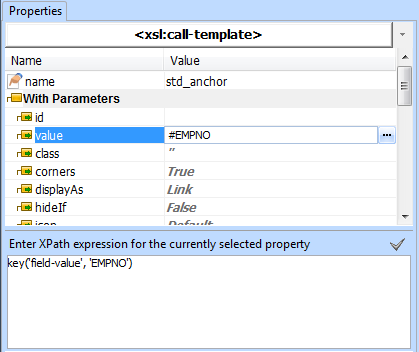
Property Tab showing a field name in the property value and the
corresponding XPath expression in the XPath entry box below.
It is not possible to use this shorthand technique when referencing columns in a list. Instead, you need to reference the column with lxml:column[@name='COLNAME'
...
].
Property tab showing a column value being referenced.
XPath expressions such as this must be entered into XPath entry area at the bottom of the properties tab. Attempting to enter the expression in the property directly will result in incorrect behavior or an error as the editor will attempt to treat it as a string.
| Note |
|---|
| Note: All field and column name references in XPath expressions must be uppercase. All references to repository fields must use the object name for the field. !worddavaf485e25f57cd86bb5b0fc63f3f1b1cc.png|height=32,width=32! Property tab showing a column value being referenced. XPath expressions such as this must be entered into XPath entry area at the bottom of the properties tab. Attempting to enter the expression in the property directly will result in incorrect behavior or an error as the editor will attempt to treat it as a string. Note: All field and column name references in XPath expressions must be uppercase. All references to repository fields must use the object name for the field. |