Page History
1. In the Design view, click anywhere on the form and select the Methods tab on the Details tab.
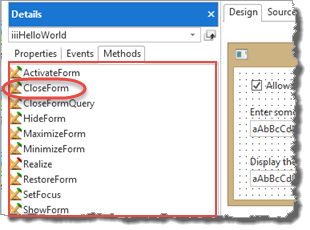
Note that your form has a CloseForm method.
2. Your form iiiHelloWorld, inherits events, properties, and methods from its Ancestor PRIM_FORM. In the Source tab, note the Begin_Com statement has Role(*EXTEND #PRIM_FORM)

3. In the Design view, drag a push button into Row 1, Column 2.
a. On the Layout ribbon, change Alignment to Top Left and Flow to Down.
b. Change margin Top to 20.
4. Set up the push button's properties:
a. Change the Push Button Name to CLOSE
b. Change its Caption to Close
c. Create a CLOSE. Click event.
d. Add the following code to this CLOSE. Click event:
#com_owner.CloseForm
...
The The generic name COM_OWNER can be used to refer to the current component.
...