Page History
...
In this first example, you will update using the key to the table. In Step 7. Update and Delete Last Record, you will modify the form to update the last record that was fetched.
1. Drag a push button on to row 1, column 2.
a. On the Layout ribbon, give it an Alignment of Bottom Center and Flow of Up.
b. Give it a margin Bottom of 10.
c. On the Details tab, set the button Name to UPDATE and Caption to Update.
d. Create a Click event routine for the UPDATE button.
2. Your form should appear like this:
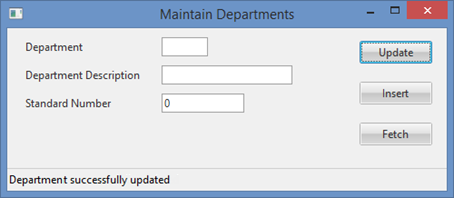
3. In the UPDATE.Click event routine, add an UPDATE command to update an existing record in the xDepartments table. Remember to add the appropriate status error checking. Once the UPDATE completes successfully, all fields on the form should be reset to their repository defaults.
Your finished code should appear as follows:
Evtroutine Handling(#UPDATE.Click) Update Fields(#formdata) In_File(xDepartments) With_Key(#xDepartmentCode) Val_Error(*next) If_Status Is(*OKAY) Message Msgtxt('Departmenmt successfully updated') #formdata := *default Else If_Status Is(*NORECORD) Message Msgtxt('Department not found') Else If_Status Is(*ERROR) Message Msgtxt('Error updating department') Endif Endif Endif Endroutine
4. Compile and execute the form.
a. Fetch your Department code 50 test record that you inserted in Step 3. Insert Data to a Table.
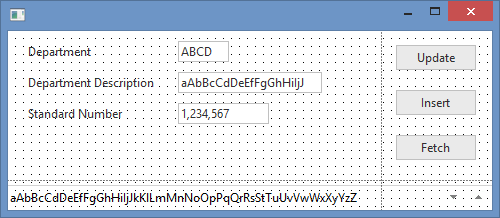
b. Change the Description to XYZ and press the Update button.
| Note |
|---|
| Note: The program validations you added on the xDepartmentDescription field in the previous step are only applied when a new record is inserted with the INSERT command, but not when the record is changed with the UPDATE command. If you wanted the rules to be applied to both INSERT and UPDATE, the best solution would be to place the validation rules in the Repository. Alternatively, all program level validation rules could be placed into a validation subroutine in the form. |
5. Close the form.
6. Using the IF_STATUS command is the recommended technique for checking the status of table operations. An alternative technique is to use the IO$STS field or another field to store the status code. For example:DEFINE FIELD
DEFINE FIELD(#RETCODE) REFFLDREFFLD(#IO$STS) UPDATE FIELDS UPDATE FIELDS(#FORMDATA) ININ_FILE(xDepartments) IOIO_STATUS(#RETCODE) IF COND(#retcode *NE OK) . . .
You You can now check the value of RETCODE to determine the status returned by the update. You could use a CASE statement as follows:CASE OF
CASE OF_FIELD(#RETCODE) WHEN VALUE WHEN VALUE_IS(= OK) MESSAGE MSGTXTOK) MESSAGE MSGTXT('Department updated successfullyDepartment updated successfully') WHEN VALUE WHEN VALUE_IS(= NR) MESSAGE MSGTXTNR) MESSAGE MSGTXT('Department not foundDepartment not found') WHEN VALUE WHEN VALUE_IS(= ER) MESSAGE MSGTXTER) MESSAGE MSGTXT('Error updating DepartmentError updating Department') WHEN VALUE WHEN VALUE_IS(= EF) MESSAGE MSGTXTEF) MESSAGE MSGTXT('End of tableEnd of table.') WHEN VALUE WHEN VALUE_IS(= BF) MESSAGE MSGTXTBF) MESSAGE MSGTXT('Beginning of tableBeginning of table.') WHEN VALUE WHEN VALUE_IS(= EQ) MESSAGE MSGTXTEQ) MESSAGE MSGTXT('Equal key foundEqual key found.') WHEN VALUE WHEN VALUE_IS(= NE) MESSAGE MSGTXTNE) MESSAGE MSGTXT('No equal key foundNo equal key found.') OTHERWISE MESSAGE MSGTXT OTHERWISE MESSAGE MSGTXT('Unidentified table operation return codeUnidentified table operation return code.') ENDCASE
| Note |
|---|
Note: If you do not explicitly specify the IO_STATUS() keyword, the return code is automatically stored in the IO$STS field. You could also simply use a CASE statement for this field: |
...
|
...
|
...
|