Page History
Important Concept
Employees belong to a department. If a new department is selected, the employees list view needs to be cleared and rebuilt.
1. Create a method routine, named GetEmployees. This routine will clear and refill the employees list view when a department is selected.
Mthroutine Name(GetEmployees) Endroutine
2. Define an input map for this routine to accept department code:
Mthroutine Name(GetEmployees) Define_Map For(*INPUT) Class(#xDepartmentCode) Name(#DepartCode) Endroutine
3. Complete the routine to perform the following:
Clear list, ListView1
Select ListView1 fields from table xEmployeeByDepartment with a key of DepartCode
Add each entry to ListView1
End Select
Your Your code should look like the following:
Mthroutine Name(GetEmployees) Define_Map For(*INPUT) Class(#xDepartmentCode) Name(#DepartCode) Clr_List Named(#ListView1) Select Fields(#ListView1) From_File(xEmployeeByDepartment) With_Key(#xDepartmentCode) Add_Entry To_List(#ListView1) Endselect Endroutine
| Note |
|---|
| Note: The ListView1 definition has been used as the Fields() parameter for the Select/EndSelect loop. |
4. Switch to the Design tab. Select the combo box. On the Details/Events tab, double click on ItemGotSelection to create an event handling routine.
5. Switch to the Source tab. Complete the form by adding code to perform the following:
At the end of the CreateInstance event routine, invoke the GetEmployees method passing xDepartmentCode
Within the ComboBox1.ItemGotSelection event routine, invoke GetEmployees passing xDepartmentCode
Your code should look like the following:
Evtroutine Handling(#com_owner.CreateInstance) Set Com(#com_owner) Caption(*component_desc) Select Fields(#xDepartmentCode #xDepartmentDescription) From_File(xDepartments) Add_Entry To_List(#ComboBox1) Endselect #com_self.GetEmployees Departcode(#xDepartmentCode) Endroutine Evtroutine Handling(#ComboBox1.ItemGotSelection) Options(*NOCLEARMESSAGES *NOCLEARERRORS) #com_self.GetEmployees Departcode(#xDepartmentCode) Endroutine
6. Compile and test your form. When it initially loads it should now look like the following:
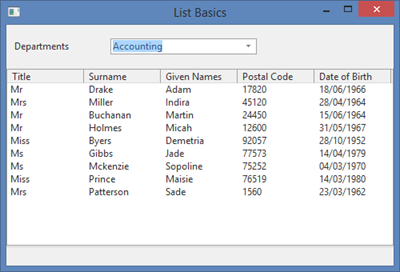
Try Try selecting a different department. The employees List View will be cleared. If the department has employees, these will be added to the List View.
...