Page History
...
You can use the Instance Lists to view and select from the available Document Standards. Using the menu commands, toolbar buttons or right-click menus you can:
- Create, copy and delete Document Standards.
- Print Document Standards definitions.
- Display and/or revise the details, attachments or notes for the Document Standards.
Document Standard Details
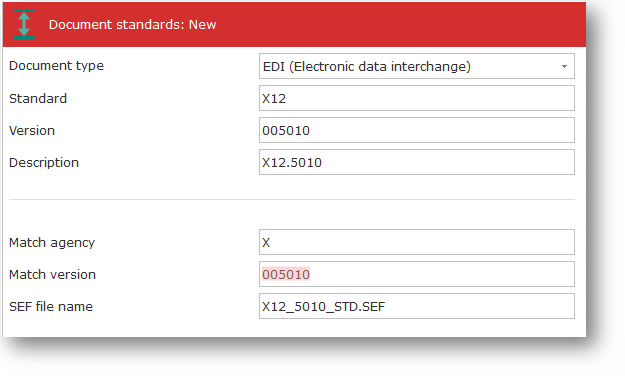
The following are the details that can be entered for a Document Standard definition:
Document Type | Specifies the Document Type to which this document standard belongs. When creating a new document standard, you can choose from a drop-down list of available Document Types. You must create a Document Type before you can create a Document Standard for that document type. |
|---|---|
Standard | Specifies a name by which this document standard will be known within LANSA Composer transaction document processing and in the LANSA Composer Document Manager. |
Version | Specifies a name by which this document standard version will be known within LANSA Composer transaction document processing and in the LANSA Composer Document Manager. |
Description | Text description for the Document Standard. |
Match agency | Specifies the agency value in the EDI transaction document that matches this document standard and version. This value (along with the Match version) is used by the DISCOVER_EDI activity to determine the Document Standard definition in LANSA Composer that applies to the subject EDI transaction document file. |
Match version | Specifies the version value in the EDI transaction document that matches this document standard and version. This value (along with the Match agency) is used by the DISCOVER_EDI activity to determine the Document Standard definition in LANSA Composer that applies to the subject EDI transaction document file. |
SEF file name | Specifies the name of the SEF (standard exchange format) file that is used by the DISCOVER_EDI activity to validate EDI transaction document files. The DISCOVER_EDI activity will expect to find the SEF file (if provided) in the directory for SEF files specified in System Settings. |