Page History
...
- Create one or more HTTP Configurations that specify how to connect to the HTTP server(s). For more information, refer to:
- Add the necessary activity(s) to your Processing Sequence, specifying the HTTP Configuration in the activity parameter where indicated and other parameter values as described in the activity descriptions.
When implementing HTTP outbound (client) processing, you can choose between two sets of supplied HTTP activities according to your needs:
Simple HTTP Outbound Activities
Advanced HTTP Outbound Activities
| Anchor | ||||
|---|---|---|---|---|
|
LANSA Composer provides two activities that allow you to send a request with an optional payload to an HTTP server and receive a response, all in one operation. They are:
Retrieves a document from an HTTP server. | |
Sends data to an HTTP server and/or receives response data from the server. |
The supplied example Processing Sequence EXAMPLE_HTTPGET1 demonstrates the use of the HTTP_SIMPLE_GET activity to retrieve a file from an HTTP server.
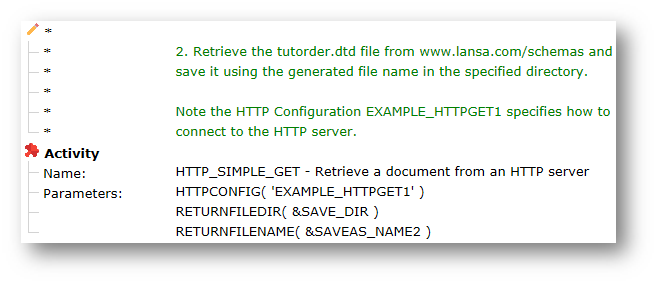
(Refer to Example Processing Sequences for information on installing and using the example Processing Sequences. Refer to the notes supplied with Processing Sequence EXAMPLE_HTTPGET1 for instructions for its use.)
...
However, for more advanced functionality, such as sending or receiving name-value pairs, multipart data and more, then you need to use the Advanced HTTP Outbound Activities instead.
| Anchor | ||||
|---|---|---|---|---|
|
LANSA Composer provides a set of advanced HTTP activities that provide maximum flexibility to prepare and send an HTTP request and receive and process the response. Using these activities it is possible to perform HTTP request processing well beyond the capabilities of the Simple HTTP Outbound Activities.
When implementing an outbound HTTP solution using these activities, you will always "bracket" the HTTP processing with these activities:
Begin HTTP outbound request handling | |
End HTTP request processing |
The HTTP_BEGIN_OUTBOUND activity specifies the HTTP Configuration that contains the details of how to connect to the required HTTP server. The HTTP_END activity indicates that the HTTP request processing is complete and associated resources may be freed.
...
You may use one or more of the following activities to prepare and send the outbound request:
Set outbound multipart component item | |
Set HTTP protocol property value(s) | |
Send request to HTTP server | |
Send file to HTTP server | |
Send multipart content to HTTP server | |
Send name-value pairs to HTTP server |
After successfully sending the HTTP request, you may use one or more of the following activities to receive the HTTP response:
Get inbound multipart component item | |
Get HTTP protocol property value(s) | |
Receive a single file HTTP payload | |
Receive HTTP payload as multipart content | |
Receive HTTP payload as name-value pairs |
If you wish to send further HTTP requests you should use the following activity before preparing and sending the next request:
Reset for further HTTP outbound requests |
The supplied example Processing Sequence EXAMPLE_HTTPGET2 demonstrates the use of HTTP_BEGIN_OUTBOUND and other advanced HTTP activities to retrieve a file from an HTTP server.
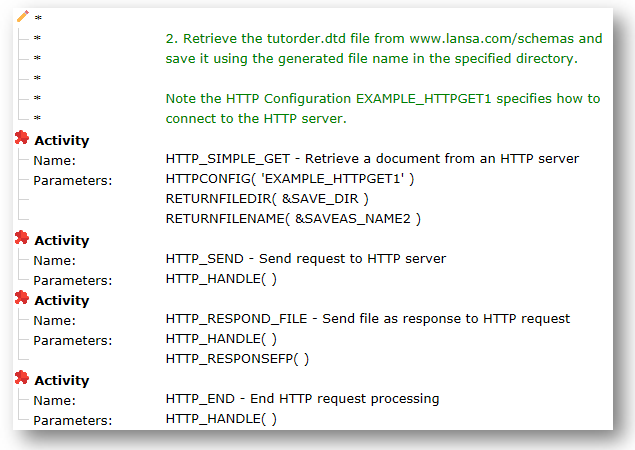
(Refer to Example Processing Sequences for information on installing and using the example Processing Sequences. Refer to the notes supplied with Processing Sequence EXAMPLE_HTTPGET2 for instructions for its use.)