Page History
...
このサンプル画面に関連付けられているスクリプトでは、以下のように 3 つの新しいファンクションを追加することができます。
...
| Code Block |
|---|
/* Apply layout changes specific to this screen */ |
...
ApplySpecificLayout : function() |
...
{ if (CHECK_FIELD_EXISTS("PageDownMarker")) |
...
...
HTMLAPI.insertSubFileScrollers("/ts/skins/images/pageup.gif",this.HandlePageUp,"/ts/skins/images/pagedown.gif",this.HandlePageDown,9,9,-46,82); |
...
else |
...
HTMLAPI.insertSubFileScrollers("/ts/skins/images/pageup.gif",this.HandlePageUp,null,null,9,9,-46,82); |
...
}, |
...
...
/* Handle clicks on the subfile scroller images images */ |
...
...
HandlePageDown: function() { EXECUTE_BUTTON_SCRIPT(KeyPageDown); }, |
...
|
...
HandlePageUp: function() { EXECUTE_BUTTON_SCRIPT(KeyPageUp); }, |
そして、画面が到着するたびに次の新しいロジックを起動できるよう、画面定義の到着スクリプト部分が変更されています。
| Code Block |
|---|
...
vHandle_ARRIVE: function(oPayload, oPreviousForm) |
...
{ var bReturn = true; |
...
...
/* If the department input field exists on the screen, display it */ |
...
...
if ( CHECK_FIELD_EXISTS("DEPTMENT") ) |
...
{ |
...
...
SHARED.ApplyStandardLayout(); |
...
this.ApplySpecificLayout(); |
...
など |
...
|
これを実行すると、サンプルの 5250 画面は以下のようになります。
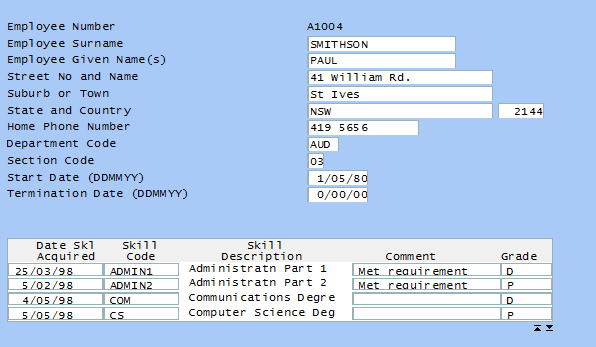
Page Up と Page Down のクリック可能なイメージがサブファイルの下に表示されていることに注意してください。クリックすると、ハンドラー・ファンクション、HandlePageUpとHandlePageDown が呼び出され、Page Up/Page Downのキーストロークがサーバーに送信されます。
...