Page History
...
- Open the Details WebRoutine in the Design view. Drag and drop a Dynamic Select Box weblet onto the department and the section field input values.
With one of the Dynamic Select Boxes selected in the Design view, select the Details tab. Notice that the weblet has adopted the field name and value: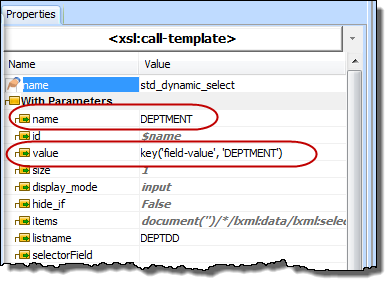
- In the Design view, select the DEPTMENT dynamic select box weblet and use the Details tab to define its properties as follows:
Property
Value
listname
DEPTDDcodeField
DEPTMENTcaptionField
DEPTDESC - Select the Section dynamic select box weblet and define its properties as follows:
Property
Value
Listname
SECTDDcodeField
SECTIONcaptionField
SECDESCNote Note: All properties can be selected from a dropdown list.
- Adjust the width of dynamic select dropdowns, so that the department and section descriptions will be visible.
- Save your changes and test your WAM by running the Begin web page.
At this stage:
...