Page History
...
To achieve these objectives you will complete the following steps:
Step 1. Create iiiSecMaint - Section Maintenance WAM
Step 2. Add a Details WebRoutine
Step 3. Create iiiSecAdd - Add Section WAM
Step 4. Complete the AddSect WebRoutine
Step 5. Set up the 'New Section' button on the Begin page for ii SecMainti
Before You Begin
- In order to complete this exercise, you should have completed all the preceding exercises.
...
The AutoComplete weblet provides suggestions while you type into the field. The suggestions are provided by a WebRoutine using Ajax.
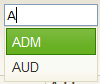
A sourceWrName property defines a called WebRoutine, which supports the AutoComplete weblet by returning a list as JSON data. The WebRoutine must have a Response(*JSON) keyword. The weblet calls this WebRoutine when you type into the input box.
A listName, labelField and ValueField define the list of values that the AutoComplete weblet displays.
| Note |
|---|
Note: The AutoComplete weblet in this exercise will display matching department codes by reading the file DEPTAB using Generic(*yes). This provides a simple introduction to implementing this weblet, but does not provide a realistic example. Since the file DEPTAB has a very small number of records a complete list of values shown in a combo box would be a better implementation. You will also use the Dynamic List Box that was part of the previous exercise. |