Page History
The life cycle of a push notifications isVisual LANSA is integrated with push notifications to keep you informed about important updates from apps. The push notifications lifecycle is the following:
- Request Permission to send push notifications.
- A user subscribes to receive push notifications from a web application resulting in a subscription object.
- The web application passes the subscription object to the application server to store it in a database.
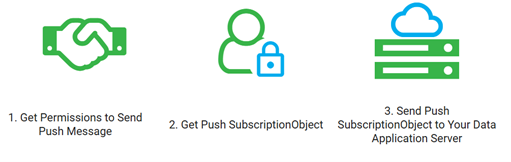
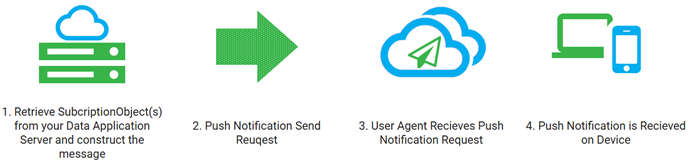
- An event is triggered on the application server to send a notification. The subscription objects are fetched from the database.
- A push notification request is sent to the user agent.
- The user agent processes the request.
- The end user receives the notification.
This methodology is made simple using LANSA with both sides of the paradigm made simple.
LANSA simplifies this entire process by making it easy to get updates:
- The Visual LANSA Web Push Manager allows users to easily subscribe Visual LANSA Web push manager allows for a user to be easily be subscribed to receive notifications and results in the subscription object.
- The Subscription subscription object is passed back to the server module and stored in a database table.
- Your LANSA defines an event for sending a notification. For example, the system will be undergoing maintenance at a given time and date, there is a sale on a product or a set of tasks have been completed.
- The subscription object can then be fetched from the database table on demand to construct a custom notification for the end user.
- The notification is sent from you your LANSA application.
LANSA’s Push Notifications implementation consolidates multiple technology stacks to allow for ease of use in your PWA application. This does away with the need for The Visual LANSA Push Notification feature simplifies the enhancement of your Progressive Web Applications (PWA). It removes the complexities associated with integrating multiple systems, languages, and technologies, writing along with the need for custom encryption programs and managing data across different platforms. All that is required is
To start using this feature you need to enable the Visual LANSA PWA enabled web application and an EC256 private key and you are away!.
Review the following sections to use the features: