Page History
Webサーバー上の手順
- [WindowsのLANSAインストール]を実行します。
- [その他の LANSA 機能] を選択します。
- [Webサーバー] を選択します。すると、[LANSA Webサーバー拡張機能] と [Webイメージ] 機能が自動的に選択されます。
- [Web アドミニストレータ] を選択します。
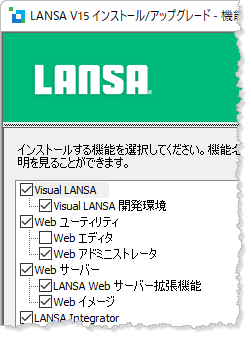
- インストール手順を完了させます。
[  |../../index.htm#lansa/lwbengh5_0015.htm]
現在地:
...
[ |../../index.htm#lansa/lwbengh5_0015.htm]
現在地:
...