...
- If a script is deleted, it is only removed from the metadata. However, because WhereScape RED never stores the script on the host system, this removes the script permanently.
- Unix scripts, Windows CMD scripts, Windows PowerShell Scripts, and User Defined Host Script Languages are available on Load objects.
- Unix scripts, Windows Scripts, and User Defined Host Script Languages are available on all table object types, where the table is stored in a custom database target and when using a Windows scheduler.
- The table object needs to specify the connection appropriate for the script (typically Windows or Unix).
Following is an example of the menu displayed when you right-click a script object.
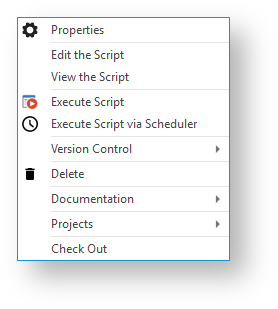 Image Added
| Note |
|---|
WhereScape RED supports the use of keyboard shortcuts—the underlined letter of a menu option. For example, pressing P opens the Properties window of the selected table, pressing D deletes the script metadata, etc. Ensure that the Windows > Control Panel > Ease of Access setting associated with keyboard shortcuts is enabled, to display keyboard shortcuts in RED. Refer to the relevant MS Windows documentation for details. |
| Anchor |
|---|
| _referencing_other_scripts_at_run-time: |
|---|
| _referencing_other_scripts_at_run-time: |
|---|
|
Referencing other scripts at run-time...
Scripts stored in your RED Metadata can be referenced from other Scripts at run-time using token replacement.
| Anchor |
|---|
| _token_replacement_format |
|---|
| _token_replacement_format |
|---|
|
Token replacement format$WSL_SCRIPT_<your_script_name_in_RED>_CODE$
| Anchor |
|---|
| _replacement_process_at_run-time |
|---|
| _replacement_process_at_run-time |
|---|
|
Replacement process at run-timeRED and RED Windows Scheduler parse the script for script reference tokens and if the script name is found in the metadata then it is written to the work directory and the token is replaced in the script with the full path to the script file before execution.
| Anchor |
|---|
| _example_powershell_use_case |
|---|
| _example_powershell_use_case |
|---|
|
Example PowerShell use case| Code Block |
|---|
|
Import-Module -FullyQualifiedName "$WSL_SCRIPT_WslPowerShellCommon_CODE$" -DisableNameChecking |
...
Example Python use case
| Code Block |
|---|
|
# Trigger the RED Script Sourcing feature
# Note: This line could also be commented out as the
#       presence of the token is all that is required
#       for RED to trigger the script to be written to
#       the work directory.
path_to_WslPythonCommon = r"$WSL_SCRIPT_WslPythonCommon_CODE$"

# Now we can import the module name
# Note: Python will automatically look for modules in the script run directory.
import WslPythonCommon |
| Note |
|---|
| WhereScape RED supports the use of keyboard shortcuts—the underlined letter of a menu option. For example, pressing P opens the Properties window of the selected table, pressing D deletes the script metadata, etc. Ensure that the Windows > Control Panel > Ease of Access setting associated with keyboard shortcuts is enabled, to display keyboard shortcuts in RED. Refer to the relevant MS Windows documentation for details. |