Page History
...
- Verifies connection to GIT Repository.
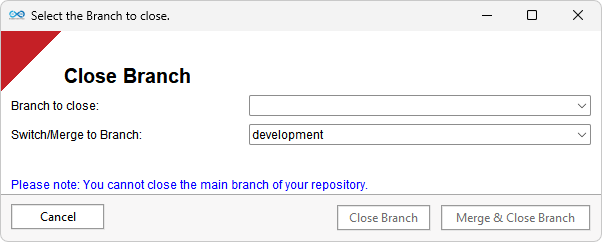
- The user is prompted to select the branch to close. The user can close a branch and discard all changes or close and merge the branch into another branch. The user will choose a branch to switch or merge to.
- If the user selects to close and merge, then a GIT merge action will take place between the selected branches. If there are any issues with this conflicts found during the merge, the user will receive a prompt to either discontinue progress on the script, or to view the conflicts:
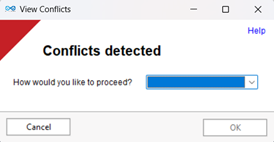
- If the user cancels, the script will be exited.
- If the users chooses to review the conflicts they will be prompted with a list of the
- conflicted files and the conflicts highlighted within them.
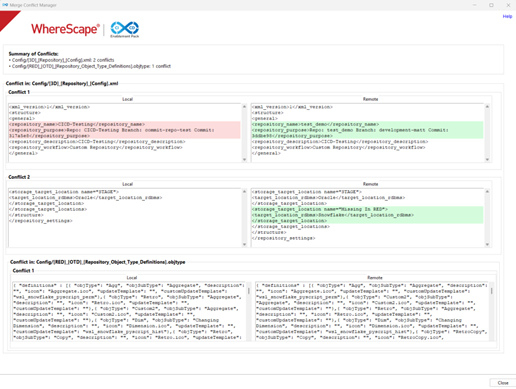
- It will then be up to the user to resolve the conflicts before trying to the Merge & Close again.
- The WhereScape app is closed.
- The local GIT repository is refreshed from the selected branch on the remote GIT repository.
- WhereScape 3D is rebuilt using the files within the local GIT repository.
- WhereScape RED (if using) is rebuilt using the files within the local GIT repository.
- WhereScape 3D is reopened.
...
- Importing XML Model Version files that contain custom UI source connections. This results in Command
- in Command line performance issues – memory leakage when running parallel tasks.
- RED Discovery & profiling connection is not compatible with the CICD/GIT functions at present. Users can create this separately, but it must be manually refreshed.
- Target Storage Locations are added to WhereScape RED via the Python Scripts, not the WhereScape command line.
- It is possible to create duplicate Data Type names. However, this will produce an error when the command line interacts with the Data Types (duplicated name).
- Templates: Templates with XML contents can result in an error when imported/exported using the command line.
...